
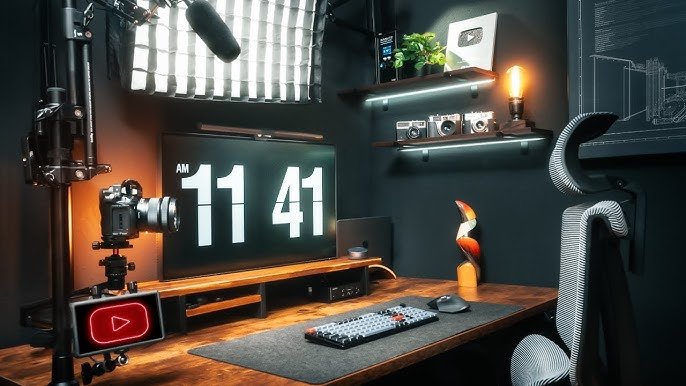

A low cost home studio gives creators in Tier 2 cities the ability to produce consistent and professional videos without renting expensive spaces. This guide explains how to build a reliable studio setup using affordable gear, practical room planning and simple technical upgrades.
A low budget studio still needs clarity, consistency and control. The location, equipment and workflow matter more than expensive gear. With the right planning, creators can produce content that meets YouTube and OTT standards while keeping investment tight and scalable.
Choose the right room and control ambient noise
Room selection is the foundation of a stable home studio setup. The best option is a small room with minimal echo, soft furnishings and low street noise. Bedrooms work better than halls because they usually have curtains, bedsheets and wardrobes that reduce reflections. Creators should place the recording desk away from windows to limit traffic noise. If the room is still echo prone, placing budget friendly acoustic foam tiles on two opposite walls helps reduce reverb. Heavy curtains and floor rugs improve the audio quality without raising costs.
Plan a modular studio layout for flexible shooting angles
A modular layout helps creators shoot multiple formats such as talking head videos, tutorials or product shots in the same room. A simple arrangement is to set up the main camera and lighting on one side and a clean background on the opposite side. A foldable backdrop stand with a solid color cloth is a practical investment because it hides clutter and gives a consistent visual identity. Creators in Tier 2 cities often have limited space, so having gear that folds away keeps the studio functional for daily living. Marking fixed positions on the floor for the tripod and chair ensures that framing remains consistent across videos.
Use budget cameras and mics that deliver professional results
Affordable devices can still produce high quality content if used correctly. For video, smartphones with good daylight performance are enough for most YouTube formats. Adding an external clip on lens can widen the frame without buying a new camera. For audio, a lavalier microphone improves clarity significantly compared to built in smartphone mics. USB condenser microphones are another option for voiceovers and screen recordings. Tripods with adjustable height and flexible phone mounts help maintain stable and repeatable shots. When using smartphones, creators should lock exposure and focus to avoid sudden brightness changes during recording.
Set up simple and effective lighting for a clean look
Lighting impacts video quality more than camera specs. A basic three point setup can be recreated on a budget. Two softboxes or LED panels placed at 45 degree angles to the subject provide even lighting. If budgets are tighter, one key light combined with natural window light is enough. A small ring light can fill shadows on the face. Diffusers such as white bedsheets or baking parchment soften the light and reduce harsh shadows. Always set white balance manually to maintain consistent color tones across multiple videos.
Optimize the background for a clean and professional frame
A studio background should be simple, distraction free and relevant to the creator’s niche. Solid color cloths, textured walls or small shelves with controlled props work well. Avoid shiny surfaces that reflect light. If the backdrop feels flat, placing a small table lamp or RGB light behind the subject adds depth to the frame. Creators should also maintain visual continuity so returning viewers feel familiar with the environment. Keeping a dedicated storage box for background props helps speed up setup time for each shoot.
Improve production quality with basic editing tools and workflow discipline
Editing is where audio levels, color tone and pacing are refined. Free software options such as mobile editors or beginner friendly desktop tools are sufficient for most formats. Maintaining a simple workflow helps creators improve efficiency. This includes labeling files, storing B roll in folders and using consistent color presets. Recording with slightly higher brightness and lowering it during editing results in cleaner output from budget cameras. Completing a test recording before shooting a long format video reduces retakes and saves time.
Takeaways
Clear audio and stable lighting matter more than an expensive camera
A modular studio layout works best in small homes
Smartphones can produce high quality content with the right accessories
Consistent backgrounds improve brand recall for viewers
FAQs
What is the minimum budget required for a basic home studio
A functional setup can start at a modest budget covering a lavalier mic, ring light, tripod and simple backdrop. Additional upgrades can be added over time.
Can smartphones replace a dedicated camera for YouTube videos
Yes, especially when combined with proper lighting, stabilization and manual exposure control. Many channels grow entirely on smartphone footage.
Is acoustic treatment necessary for a home studio
Basic treatment improves audio quality, but it does not have to be expensive. Curtains, rugs and foam panels are enough for most small rooms.
How much space is needed for a home studio
A small bedroom sized area is enough if the layout is planned correctly and equipment is modular and easy to reposition.