

Short summary
WhatsApp privacy controls have evolved to address spam calls, unknown messages, and chat security concerns. This guide explains how to silence unknown callers, protect chats, and use WhatsApp privacy settings correctly to reduce harassment and keep personal conversations secure.
Understanding the intent and nature of the topic
This is an evergreen informational topic with ongoing relevance. While WhatsApp introduces updates gradually, the core privacy tools discussed here are stable features available to most users. The tone below is explanatory and practical, focused on long-term digital safety.
Why WhatsApp privacy matters more than ever
WhatsApp privacy has become a critical concern as spam calls, scam messages, and unknown contacts increase across India. Users in Tier 2 and Tier 3 cities are often targeted due to wider mobile penetration and limited awareness of in-app controls. WhatsApp remains a default communication tool for families, businesses, and local communities, making it an attractive channel for misuse.
Unknown callers can disrupt daily life and pose security risks. Similarly, unsecured chats can expose personal information if phones are lost, shared, or compromised. WhatsApp privacy settings are designed to address these risks, but many users never adjust them beyond the default setup.
Understanding and enabling these controls is essential for protecting conversations without leaving the platform.
How to silence unknown callers on WhatsApp
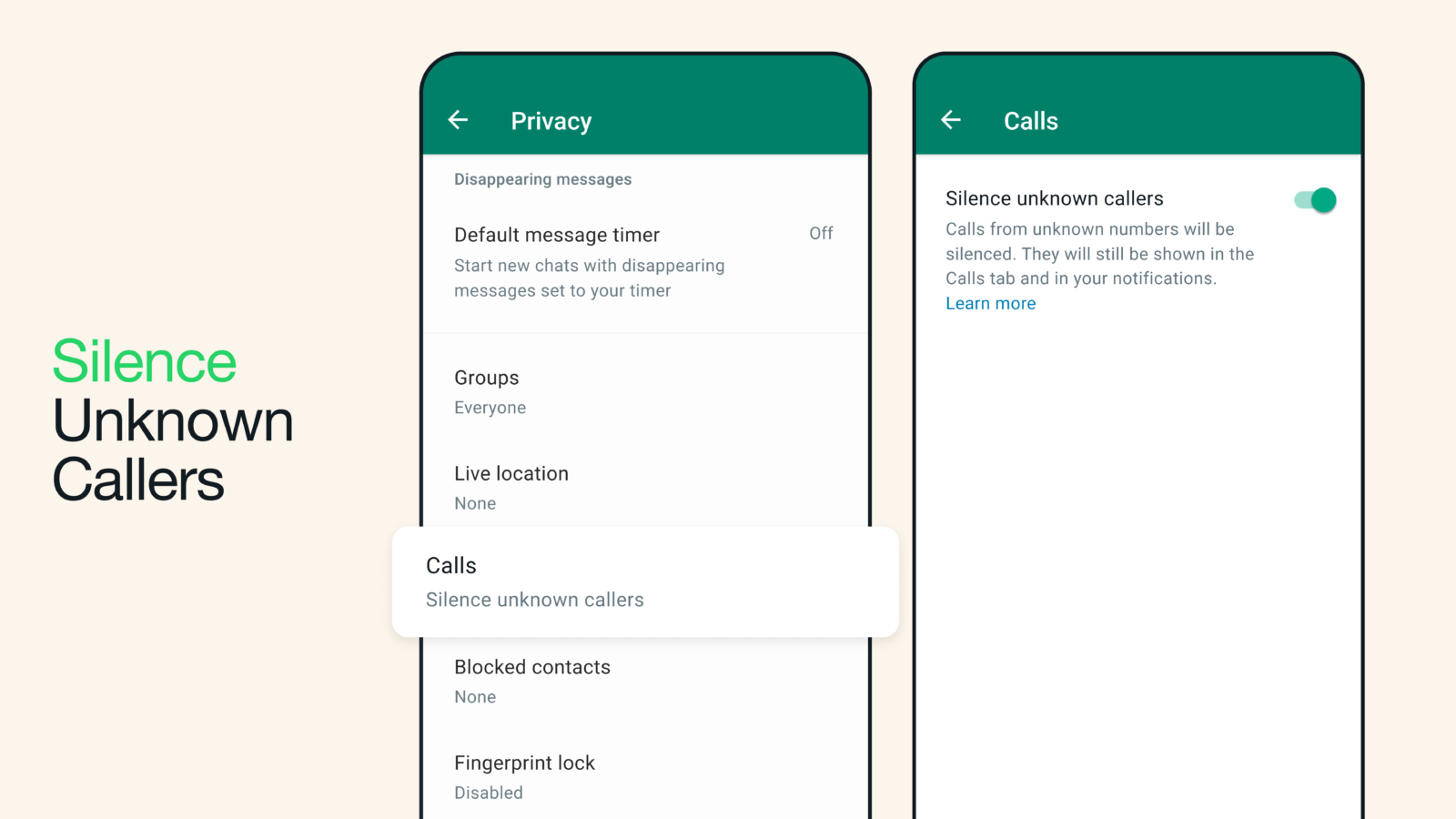
The silence unknown callers feature is one of the most effective WhatsApp privacy tools. When enabled, calls from numbers not saved in your contacts are automatically silenced. These calls do not ring, but they still appear in the call log so users can review them later.
To enable this, open WhatsApp settings and go to Privacy, then Calls. Turn on Silence Unknown Callers. Once activated, the app filters incoming calls based on your contact list.
This feature is especially useful during peak spam periods and prevents disruption without blocking genuine contacts. It does not notify the caller that their call has been silenced, maintaining discretion.
Blocking and reporting spam numbers
Silencing calls reduces interruptions, but blocking and reporting spam adds another layer of protection. When a suspicious number messages or calls repeatedly, users can block it directly from the chat or call log.
Blocking prevents future communication from that number. Reporting sends metadata to WhatsApp to improve spam detection across the platform. This helps reduce similar spam attempts for other users as well.
For best results, users should block and report clear spam or scam numbers rather than simply deleting the chat. This strengthens WhatsApp’s automated filtering systems over time.
Protecting chats with privacy and security settings
Chat protection goes beyond blocking unknown numbers. WhatsApp offers multiple privacy settings that control who can see your profile photo, last seen, online status, and about information.
Setting these fields to My Contacts or My Contacts Except limits exposure to unknown users. This reduces the chances of targeted spam or impersonation attempts.
Users can also enable chat lock using device authentication. Locked chats are hidden from the main chat list and require fingerprint, face recognition, or a passcode to access. This is useful for shared devices or situations where phones are frequently handled by others.
Using disappearing messages and view once media
Disappearing messages are another effective privacy tool. When enabled, messages automatically delete after a set period. This reduces long-term data exposure and limits the impact of unauthorized access.
View once media ensures that photos and videos can only be opened once and cannot be saved or forwarded. This is particularly helpful for sensitive content such as documents or personal images.
These features do not replace end-to-end encryption but add practical safeguards against misuse after delivery.
Securing backups and account access
While WhatsApp chats are end-to-end encrypted, backups may not be encrypted by default unless users enable encrypted backups manually. Turning on encrypted backups ensures that chat history stored in cloud services remains inaccessible without a password or encryption key.
Users should also enable two-step verification. This adds a PIN requirement when registering the account on a new device, preventing unauthorized access through SIM swap or phone theft.
Keeping the app updated is equally important, as privacy improvements and security patches are often delivered through regular updates.
Common mistakes users make with WhatsApp privacy
Many users assume default settings are sufficient. In reality, default visibility settings are often broad. Another common mistake is sharing one-time passwords or verification codes received via WhatsApp, which can lead to account takeover.
Ignoring unknown calls without enabling silence or blocking features also leaves users exposed to repeated attempts. Privacy requires proactive configuration rather than reactive cleanup.
Takeaways
Silencing unknown callers reduces spam without blocking genuine contacts
Blocking and reporting numbers strengthens platform-wide spam protection
Chat lock, disappearing messages, and view once media add practical security
Encrypted backups and two-step verification protect long-term chat access
FAQs
Will silenced calls still show in my call history
Yes. Silenced calls appear in the call log but do not ring or notify you.
Does blocking a number notify the other person
No. WhatsApp does not inform users when they are blocked.
Are WhatsApp chats already encrypted by default
Yes. Chats are end-to-end encrypted, but backups need manual encryption for full protection.
Can unknown contacts see my profile information
They can if your privacy settings are set to Everyone. Changing this to My Contacts limits visibility.