

Setting up basic AI workflows before the India AI Summit can give students and professionals a practical edge. Instead of attending sessions with only theoretical knowledge, you can experiment with real tools and understand how artificial intelligence workflows function in real projects.
This guide explains how to build simple AI workflows using free tools that require no advanced coding. The focus is on practical implementation, covering generative AI tools, automation platforms, and beginner friendly machine learning utilities that are widely accessible in India.
Understand What an AI Workflow Means
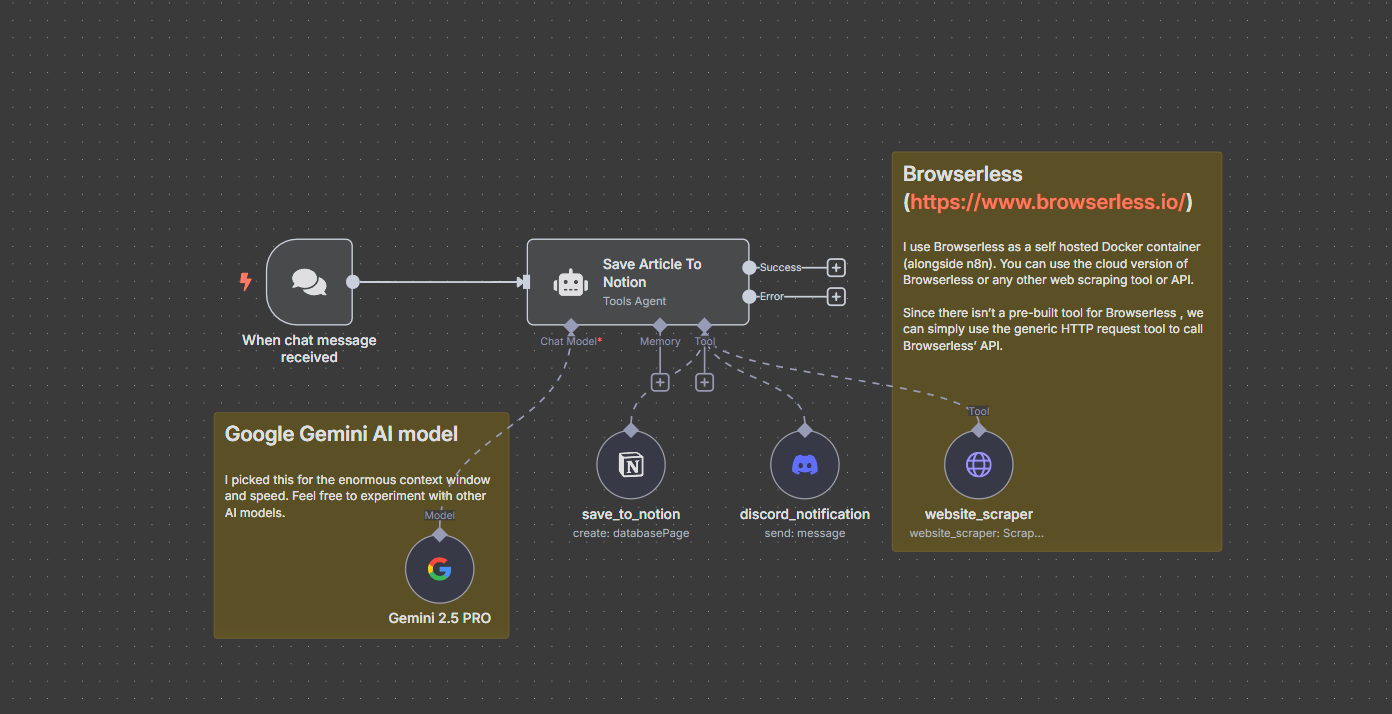
An AI workflow is a structured sequence where data enters a system, an artificial intelligence model processes it, and the output is delivered in a usable format. In simple terms, input, processing, and output.
For beginners, AI workflows usually fall into three categories. Text generation workflows using large language models. Data analysis workflows using spreadsheets and machine learning tools. Automation workflows connecting AI tools with email, forms, or social media.
Before the India AI Summit, understanding these basics helps you follow discussions around AI deployment, enterprise automation, and generative AI adoption.
Step 1: Define a Simple Use Case
Start with a small problem. Do not attempt complex AI model training at first.
Examples of beginner friendly AI workflow projects include:
Generating product descriptions from bullet points
Summarizing long documents into key insights
Classifying customer feedback into categories
Automating email responses for common queries
Choose one use case that aligns with your career goals. If you are a marketing student, build a content generation workflow. If you are in operations, try automating repetitive tasks.
Clarity of purpose prevents tool overload.
Step 2: Use Free Generative AI Tools for Text Workflows
For text based AI workflows, you can use free AI platforms that offer limited daily access. These tools allow you to input prompts and generate structured output.
Create a repeatable structure. For example:
Input: Product features in bullet format
Prompt template: Convert features into a professional product description of 120 words
Output: Final marketing copy
Save your prompt template in a document. This is your basic AI workflow template.
You can improve quality by refining instructions. Add tone, word limit, and audience type. Over time, you will understand how prompt engineering affects output.
This exercise builds foundational skills that are relevant to generative AI in India and global AI applications.
Step 3: Build a No Code Automation Workflow
To move beyond manual copy paste, use free automation tools that connect apps. Many platforms offer limited free plans suitable for beginners.
A simple automation workflow might look like this:
Google Form collects customer questions
Responses are stored in Google Sheets
AI tool generates summarized replies
Email tool sends draft responses for review
Even if you do not fully automate replies, connecting form data with AI generated drafts shows how AI workflows integrate into business processes.
This mirrors real world enterprise AI automation systems discussed at technology summits.
Step 4: Try Beginner Machine Learning Tools
If you want exposure to machine learning basics, use free tools like spreadsheet based prediction add ons or cloud notebooks with free tiers.
You can upload a small dataset such as sales numbers and try simple forecasting or classification models. Many platforms provide visual interfaces that do not require deep coding.
Focus on understanding concepts:
Training data
Prediction output
Accuracy
Model limitations
You do not need advanced mathematics for basic exposure. The goal is conceptual clarity before attending AI focused sessions.
Step 5: Document Your Workflow Like a Project
Treat your AI workflow as a mini project.
Create a short document covering:
Problem statement
Tools used
Workflow steps
Output example
Limitations
Future improvements
This documentation becomes valuable during networking at the India AI Summit. When someone asks about your interest in AI, you can refer to an actual working experiment rather than theoretical curiosity.
It also helps in interviews for AI related internships or entry level roles.
Common Mistakes Beginners Should Avoid
Avoid relying blindly on AI output. Always verify facts, grammar, and context.
Do not upload sensitive personal or confidential business data into free tools. Data privacy remains an important issue in AI adoption.
Do not overcomplicate the workflow. Start small. Automation and scaling can come later.
Finally, focus on understanding logic rather than chasing too many tools at once.
Why This Preparation Matters Before an AI Summit
Technology conferences often discuss AI strategy, AI regulation, startup innovation, and enterprise transformation. Without hands on exposure, many discussions sound abstract.
When you build even a simple AI workflow, you begin to understand practical constraints such as prompt quality, output inconsistency, and integration challenges.
This makes summit sessions more meaningful and helps you ask better questions.
Preparation transforms you from a passive attendee into an informed participant.
Takeaways
• Start with one clear use case before building an AI workflow
• Use free generative AI tools and simple automation platforms
• Document your project to showcase practical skills
• Focus on understanding workflow logic rather than complex coding
FAQs
Q1: Do I need coding knowledge to build basic AI workflows?
No. Many free tools offer no code or low code interfaces suitable for beginners.
Q2: Are free AI tools enough for learning purposes?
Yes. For conceptual clarity and small projects, free versions are sufficient. Advanced deployment requires paid or enterprise tools.
Q3: How long does it take to set up a simple AI workflow?
A basic text generation or automation workflow can be created in a few hours if the use case is clearly defined.
Q4: Can this help in AI related job interviews?
Yes. Demonstrating a small working AI workflow shows initiative and practical understanding, which employers value.