
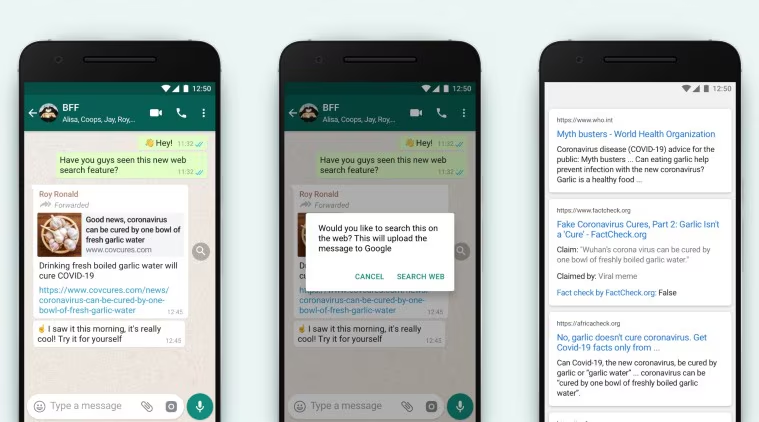

Fake news and viral WhatsApp messages spread faster than ever, especially during elections, disasters, health scares, and major public events. Learning how to verify fake news can help people avoid misinformation, make informed decisions, and prevent the accidental spread of false claims.
Why Fake News Spreads So Quickly on WhatsApp
WhatsApp has become one of the most widely used communication platforms in India. Messages can be forwarded to multiple groups and contacts within seconds, allowing information to spread rapidly.
The problem is that many viral messages appear convincing. They often include emotional language, urgent warnings, government logos, celebrity names, or claims that encourage users to “share immediately.” These tactics are designed to trigger reactions before people have time to verify the information.
Fake news creators frequently exploit public fears, health concerns, financial issues, and breaking news situations. Once a message gains momentum, it can continue circulating long after it has been proven false.
Understanding these tactics is the first step toward identifying misinformation before sharing it with others.
Check the Original Source Before Believing Claims
One of the easiest ways to verify information is to identify the original source.
Ask yourself:
- Who published the information?
- Is a credible news organization mentioned?
- Does the message include a verifiable government source?
- Can the claim be found on an official website?
Many fake messages cite unnamed officials, anonymous experts, or vague government departments. Genuine announcements are usually published through official government portals, recognized institutions, or established news organizations.
If a message claims a new law has been introduced, visit the relevant government website. If it claims a company has announced a major change, check the company’s official communication channels.
A lack of a credible source is often a strong warning sign.
Use Reverse Image Search for Viral Photos
Images are commonly used to make fake news appear authentic. However, many viral photos are taken from unrelated events and presented out of context.
Reverse image search can help identify the original source of an image within minutes.
Upload the image to a reverse image search tool and review where it has appeared previously. You may discover that a photo claimed to show a recent incident was actually taken years ago in a different country.
This technique is especially useful during natural disasters, political events, protests, and public emergencies when misleading visuals often circulate online.
Images alone should never be considered proof without supporting evidence from reliable sources.
Verify Dates, Locations, and Context
A message may contain real information but still be misleading because it lacks proper context.
Many viral WhatsApp messages recycle old news stories and present them as current events. A genuine incident from several years ago can easily be shared as if it happened yesterday.
Before accepting a claim, verify:
- The publication date
- The location of the event
- Whether the information is still relevant
- Whether newer updates are available
Context matters. A photograph, video, or news report can create a false impression if important details are removed.
Checking multiple reliable sources helps ensure the information reflects the full story rather than a selective version of events.
Cross-Check with Trusted News Sources
One of the fastest ways to verify a viral claim is to search for it using trusted news sources.
Major events, government decisions, public safety alerts, and policy changes are usually reported by multiple reputable organizations. If a message claims something significant but no credible news outlet has covered it, caution is warranted.
Fact-checking organizations also regularly investigate viral rumors, manipulated videos, and false social media posts. Searching the main claim along with terms such as “fact check” can often reveal whether the information has already been debunked.
Relying on multiple independent sources reduces the risk of being misled by a single inaccurate report.
Develop a Simple Verification Habit
The most effective defense against misinformation is a consistent verification routine.
Before forwarding any viral message:
- Identify the source.
- Verify the date and location.
- Search for independent confirmation.
- Check images and videos for authenticity.
- Pause before sharing emotional or sensational claims.
These steps typically take only a few minutes but can prevent false information from spreading to hundreds or even thousands of people.
Digital literacy is becoming an essential skill in the modern information age. The ability to distinguish between verified facts and viral rumors helps protect individuals, families, and communities from misinformation.
Key Takeaways
- Always identify the original source before trusting a WhatsApp message.
- Use reverse image search to verify viral photos and visuals.
- Check dates, locations, and context to avoid being misled by old information.
- Cross-check important claims with trusted news organizations and fact-checkers.
FAQ
How can I tell if a WhatsApp message is fake?
Look for missing sources, emotional language, urgent forwarding requests, spelling errors, and claims that cannot be verified through credible channels.
Are forwarded messages always unreliable?
No. Some forwarded messages contain accurate information. However, every claim should be verified independently before being shared.
Can old news stories become fake news?
Yes. Real stories from previous years are often reshared without context, making them appear to be current events.
What should I do if I receive suspicious information?
Do not forward it immediately. Verify the source, check trusted news outlets, and confirm the details before sharing with others.
(verify fake news, WhatsApp fact checking, viral message verification, misinformation awareness, digital literacy, fake news detection, reverse image search, social media fact check, online misinformation, WhatsApp safety tips)