
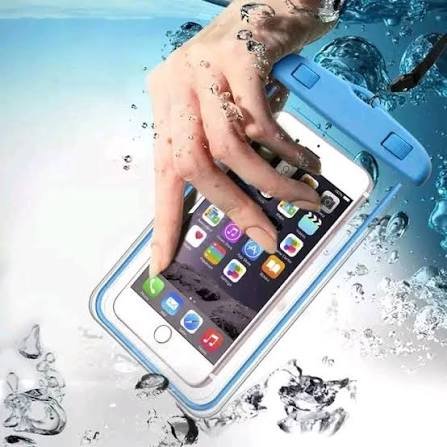

Protecting your phone during heavy monsoon rains is essential to avoid water damage, costly repairs, and data loss. With India’s rainy season bringing sudden downpours and high humidity, following a few practical precautions can help keep your smartphone safe and functioning properly.
Monsoon rains are a welcome relief from the summer heat, but they also pose a serious threat to smartphones. Knowing how to protect your phone during heavy monsoon rains can help you avoid expensive repairs, unexpected breakdowns, and permanent data loss. While many modern smartphones offer some level of water resistance, they are not completely waterproof. Rainwater, humidity, and accidental exposure can still damage internal components if proper precautions are not taken.
Understand What Water Resistance Really Means
One of the biggest misconceptions among smartphone users is that a water-resistant phone can safely be used in the rain. In reality, water resistance ratings such as IP67 or IP68 indicate that a device has been tested under controlled laboratory conditions using fresh water.
Rainwater often contains dust, pollutants, and other particles that can affect a phone differently than clean water. Moreover, pressure from heavy rainfall or prolonged exposure may allow moisture to enter through charging ports, speakers, microphones, or damaged seals.
If your phone does not carry an official IP rating, it should always be treated as vulnerable to water damage.
Use a Waterproof Phone Pouch or Protective Case
A waterproof phone pouch is one of the simplest and most effective accessories during the monsoon season. These transparent pouches protect the device from rain while allowing users to access the touchscreen.
For people who travel frequently on two-wheelers, commute by public transport, or work outdoors, investing in a high-quality waterproof pouch can significantly reduce the risk of accidental water exposure.
If you already use a phone case, consider switching to a rugged case with better edge protection and raised bezels. While it may not stop water from entering ports, it can help reduce damage if the phone slips from wet hands.
Avoid Charging a Wet Phone
One of the most common mistakes after a phone gets wet is plugging it into a charger immediately. Moisture inside the charging port can cause short circuits, corrosion, or permanent damage to the charging components.
If your phone has been exposed to rain, first switch it off if possible. Gently wipe the exterior using a clean, dry microfiber cloth. Allow the charging port to air dry completely before connecting any charger or cable.
Many newer smartphones can detect moisture inside the charging port and display a warning message. If you see such a notification, wait until the phone has dried naturally before attempting to charge it.
Protect Your Phone from High Humidity
Heavy monsoon rains bring more than just water. Increased humidity can also affect electronic devices over time.
Avoid leaving your smartphone in damp bags, wet clothes, or poorly ventilated spaces. If your backpack gets soaked, move your phone into a dry compartment or waterproof pouch immediately.
Indoor humidity can also lead to moisture buildup. Keeping your phone in a cool, dry environment whenever possible helps reduce long-term exposure.
Users living in coastal cities or regions with prolonged rainfall should pay extra attention to storage conditions during the rainy season.
Keep Important Data Backed Up
Even with proper precautions, accidents can happen. A sudden fall into water or unexpected flooding can render a smartphone unusable.
Regular cloud backups ensure that photos, contacts, documents, and important files remain safe even if the device is damaged. Most Android smartphones and iPhones offer automatic backup options that work over Wi-Fi.
Backing up data regularly also makes it easier to switch to a replacement device without losing valuable information.
What to Do If Your Phone Gets Wet
Quick action can often reduce the extent of damage.
First, remove the phone from water immediately. Switch it off and remove any accessories such as the case, SIM card, or memory card if possible.
Dry the outer surface using a soft cloth. Do not use a hair dryer, microwave, or direct heat source, as excessive heat can damage sensitive internal components.
Avoid pressing unnecessary buttons because this may push water deeper inside the device.
If the phone does not turn on after drying, or if the display, speakers, or charging port stop functioning normally, seek assistance from an authorised service centre instead of attempting unsafe repairs at home.
Everyday Habits That Can Prevent Water Damage
Small habits often provide the best protection during the monsoon season.
Keep your phone inside a zippered pocket instead of holding it while walking in heavy rain. Avoid placing it on wet tables or vehicle seats. Carry a small microfiber cloth to wipe away moisture whenever needed.
Motorcycle riders should use waterproof mobile holders or store the device inside a waterproof compartment rather than exposing it directly to rain.
These simple precautions can significantly reduce the chances of accidental water damage throughout the rainy months.
Conclusion
The Indian monsoon creates challenging conditions for smartphones, but a little preparation goes a long way. Using waterproof protection, avoiding moisture inside charging ports, backing up important data, and handling a wet phone correctly can help extend the life of your device.
Whether you own a premium flagship phone or an affordable budget smartphone, following these practical monsoon safety tips can help you avoid unnecessary repair costs and keep your device functioning reliably throughout the rainy season.
Key Takeaways
- Use a waterproof pouch or protective case when travelling during heavy rain.
- Never charge your phone until the charging port is completely dry.
- Back up important data regularly to prevent data loss after accidental water damage.
- Handle a wet phone carefully and seek professional service if problems persist.
Frequently Asked Questions
1. Is a water-resistant phone completely waterproof?
No. Water-resistant phones are designed to withstand limited exposure under controlled conditions. They can still be damaged by heavy rain, dirty water, or prolonged exposure.
2. Can I use my phone in light rain?
It is better to avoid using your phone directly in the rain. Even light rainfall can allow moisture to enter charging ports, speakers, or damaged seals over time.
3. Should I put a wet phone in rice?
Rice is not considered a reliable method for drying smartphones. Air drying in a well-ventilated area is safer, and professional servicing is recommended if water has entered the device.
4. What is the best accessory for protecting a phone during monsoon?
A certified waterproof phone pouch is one of the most effective and affordable options for protecting smartphones from rain and accidental water exposure.