
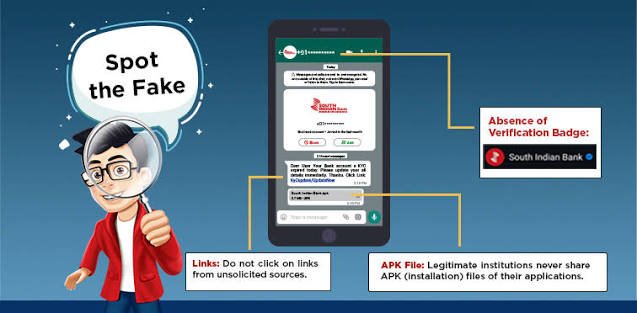

Fake KYC messages are increasingly used by cybercriminals to trick banking customers into sharing sensitive information. These messages often threaten account suspension, promise immediate verification or demand urgent action through suspicious links. Knowing how to identify fake KYC alerts can help Indian consumers protect their bank accounts and avoid financial fraud.
What Is KYC and Why Do Banks Ask Customers to Update It?
KYC stands for Know Your Customer. It is a verification process used by banks and other regulated financial institutions to establish the identity and address of their customers. The process helps financial institutions prevent identity theft, money laundering and other financial crimes.
Banks collect documents such as Aadhaar, PAN, passport, voter ID or other officially accepted identity and address proofs, depending on the applicable rules and customer requirements.
KYC is not a one-time activity in every situation. Financial institutions are required to periodically update customer information according to regulatory requirements. Customers may receive legitimate reminders when their KYC details need updating.
However, cybercriminals exploit this requirement by sending fake messages that look like genuine bank notifications. They use the fear of account suspension to convince customers to share confidential information.
The Reserve Bank of India (RBI) issued a specific warning about KYC-related fraud in February 2024, highlighting how criminals use unsolicited calls, SMS messages and emails to obtain personal and banking information. Reserve Bank of India+1
7 Warning Signs of Fake KYC Messages
Identifying a fraudulent KYC message becomes easier when customers know what to look for. Here are seven common warning signs.
1. Messages Threatening Immediate Bank Account Blocking
One of the most common tactics involves creating panic.
A customer might receive a message claiming that their bank account will be blocked within 24 hours unless they complete KYC verification immediately.
Such messages may include statements like:
- Your bank account will be suspended today.
- Your KYC verification has expired.
- Update your PAN immediately to avoid account closure.
- Your mobile banking access will be disabled.
Fraudsters use these warnings to prevent customers from thinking carefully before responding.
The RBI has specifically warned that criminals use threats of account freezing, blocking or closure to manipulate customers into sharing confidential information. Reserve Bank of India+1
2. Suspicious Links in SMS and WhatsApp Messages
Fake KYC messages frequently contain links that direct customers to fraudulent websites.
These websites may imitate the appearance of popular Indian banks, including their logos, colours and login pages.
Once a customer opens the link, the website may ask for:
- Bank account numbers
- Customer ID or internet banking details
- Debit card information
- PAN and Aadhaar details
- OTP and UPI PIN
Customers should avoid entering banking information through links received from unknown numbers or unverified sources.
The RBI’s 2026 KYC fraud awareness material specifically advises people not to enter KYC details through unknown links. Reserve Bank of India+1
3. Unknown Mobile Numbers and Suspicious Sender IDs
Genuine bank notifications generally come through recognised communication channels. However, fraudsters can use unfamiliar numbers, misleading sender names and impersonation techniques to make their messages appear authentic.
A message claiming to represent a bank should not be trusted simply because it mentions the customer’s name or bank account.
Even if the message appears professionally written, customers should independently verify the information through their bank’s official application, website or branch.
4. Requests for OTP, PIN or Passwords
This is one of the clearest warning signs of an online banking scam.
Fraudsters may claim that they need an OTP to complete KYC verification or reactivate a blocked account.
Customers must remember that they should never disclose their OTP, ATM PIN, UPI PIN, CVV or banking password to anyone claiming to represent a bank.
The RBI has repeatedly clarified that banks and payment service providers do not ask customers to share confidential credentials such as OTPs, PINs and passwords. Reserve Bank of India+1
5. Requests to Download Unknown Applications
Some scammers ask customers to install mobile applications through links sent over SMS or WhatsApp.
These applications may provide criminals with access to sensitive information on the device. Certain remote-access applications can also allow outsiders to observe or control activities on a phone.
Customers should download banking applications only through trusted app stores and verify the developer’s identity before installation.
6. Poorly Written Messages and Incorrect Website Addresses
Spelling mistakes, unusual grammar and suspicious website addresses can indicate phishing attempts.
For example, a fraudulent website might use a domain name that looks similar to a bank’s official address but contains additional characters or spelling changes.
Customers should carefully examine website addresses before entering any information. An HTTPS connection alone does not prove that a website is genuine.
7. Unusual Payment Requests for KYC Verification
Fraudsters may demand a small payment, processing charge or verification fee to complete KYC.
They may also send QR codes or UPI payment requests, claiming that customers need to approve them to receive account verification.
Customers should be cautious about unexpected payment requests connected to KYC. Receiving money through UPI does not require entering a UPI PIN.
The RBI has warned about fraudulent UPI collect requests and other payment-related tricks used to steal money. Reserve Bank of India
How to Verify Whether a KYC Message Is Genuine
Receiving a KYC notification does not automatically mean it is fraudulent. Banks may legitimately remind customers about pending verification requirements.
The important thing is to verify the notification without using the link provided in an unexpected message.
Customers can follow these steps:
Step 1: Open your bank’s official application
Log in through the banking application already installed on your device. Check whether there is a notification about pending KYC verification.
Step 2: Visit the official banking website
Type the bank’s website address directly into your browser instead of clicking an unfamiliar link.
Step 3: Contact customer support
Use the customer care number printed on your debit or credit card, bank statement or official website.
Step 4: Visit your nearest bank branch
If you are unsure about the notification, visit the branch and ask whether your KYC details require updating.
Step 5: Check your registered communication channels
Compare the message with notifications available through your bank’s official application or other verified communication channels.
These steps are particularly useful for senior citizens, first-time digital banking users and customers living in smaller cities, where fraudulent messages may create confusion about genuine banking procedures.
How to Protect Yourself From Online Banking Scams
Preventing online banking fraud requires a few basic precautions. Customers who regularly use UPI, mobile banking and internet banking should follow these practices.
Never Share Sensitive Banking Information
Keep your banking credentials private. Never share OTPs, UPI PINs, ATM PINs, CVV numbers or passwords with anyone over phone calls, SMS, WhatsApp or email.
Even if someone claims to be a bank employee or government official, do not disclose these details.
Enable Banking Alerts
Activate SMS and email notifications for banking transactions. These alerts can help customers identify unauthorised transactions quickly.
If you receive a transaction notification that you did not initiate, contact your bank immediately.
Use Official Banking Applications
Download banking applications only from trusted sources. Avoid installing APK files or applications shared through unknown links.
Keep your mobile operating system and banking applications updated to reduce security risks.
Avoid Banking Transactions on Public Wi-Fi
Public Wi-Fi networks in railway stations, shopping centres, hotels and cafes may not offer adequate security.
Avoid accessing internet banking or making financial transactions through unknown public networks.
Use Strong and Unique Passwords
Create different passwords for banking applications, email accounts and shopping platforms. Avoid using easily guessed combinations such as birth dates, phone numbers or common words.
What Should You Do If You Have Already Clicked a Fake KYC Link?
If you have clicked a suspicious link, do not panic. However, take immediate steps to protect your financial information.
- Stop interacting with the website: Do not enter additional information or download applications.
- Contact your bank: Inform the bank about the suspicious link and follow its instructions to secure your account.
- Change compromised passwords: If you entered your banking or email credentials, change them immediately using official applications or websites.
- Block affected payment methods: Ask your bank to block compromised cards, UPI access or other affected banking facilities where necessary.
- Check recent transactions: Review your bank statements and transaction history for unfamiliar payments.
- Remove suspicious applications: If you installed an unknown application, disconnect your device from the internet and seek trusted technical assistance.
If money has been stolen, report the incident immediately through India’s National Cyber Crime Reporting Portal or the 1930 cybercrime helpline.
How to Report Online Banking Fraud in India
Indian consumers have access to official channels for reporting financial cybercrime.
The Ministry of Home Affairs operates the Indian Cyber Crime Coordination Centre (I4C), which supports coordination and reporting of cybercrime cases.
Customers who experience online banking fraud should take the following steps:
1. Call 1930: Contact the national cybercrime helpline as soon as possible after discovering a fraudulent financial transaction.
2. Visit the cybercrime portal: Register a complaint through the official website, cybercrime.gov.in.
3. Inform your bank: Report the unauthorised transaction and request assistance in blocking further transactions.
4. Preserve evidence: Keep screenshots of suspicious messages, phone numbers, transaction IDs, payment details and other relevant information.
5. Follow up on the complaint: Save the acknowledgement or complaint reference number and provide additional information if requested.
Quick reporting is important because authorities and financial institutions may be able to take steps to prevent or limit further movement of the stolen money.
According to information shared by the Ministry of Home Affairs in July 2026, the Citizen Financial Cyber Fraud Reporting and Management System had helped save more than ₹11,158 crore across over 32.80 lakh complaints as of June 30, 2026. This highlights the importance of reporting financial fraud without delay. Press Information Bureau+1
Can Banks Legally Ask Customers to Update KYC?
Yes. Banks and other regulated financial institutions are required to conduct periodic KYC updates under applicable RBI guidelines.
However, customers should distinguish between a legitimate KYC requirement and a fraudulent request for confidential information.
The RBI advises customers to exercise caution when receiving SMS or email messages containing links for periodic KYC updates.
If KYC verification is pending, customers should use their bank’s authorised channels to complete the process.
Depending on the bank’s applicable procedures and the customer’s circumstances, KYC updates may be completed through an authorised digital process, an official application or a bank branch.
Customers should not assume that every KYC reminder is fake. Equally, they should never trust an unexpected message simply because it uses a bank’s name or logo. Reserve Bank of India+1
Key Takeaways
- Fake KYC messages often use account-blocking threats and urgent deadlines to manipulate banking customers.
- Never share OTPs, PINs, passwords, CVV numbers or confidential banking information with unknown individuals.
- Verify KYC notifications through official bank applications, websites or branches instead of clicking suspicious links.
- Report financial cyber fraud immediately through 1930 or the official cybercrime portal.
Frequently Asked Questions (FAQs)
1. How can I identify a fake KYC message from a bank?
Look for suspicious links, unknown sender numbers, urgent account-blocking threats and requests for OTPs, PINs or passwords. Verify the notification directly through your bank’s official channels.
2. Do banks ask customers to share OTPs for KYC verification?
No. Customers should never disclose OTPs, UPI PINs, ATM PINs or banking passwords to anyone claiming to represent a bank.
3. What is the 1930 helpline number used for?
The 1930 helpline is India’s national helpline for reporting financial cyber fraud. Customers can call it to report unauthorised financial transactions and seek assistance.
4. What should I do if I accidentally shared my KYC details with scammers?
Contact your bank immediately, secure your banking credentials, check for unauthorised transactions and report the incident through 1930 or cybercrime.gov.in. Preserve all relevant evidence.