
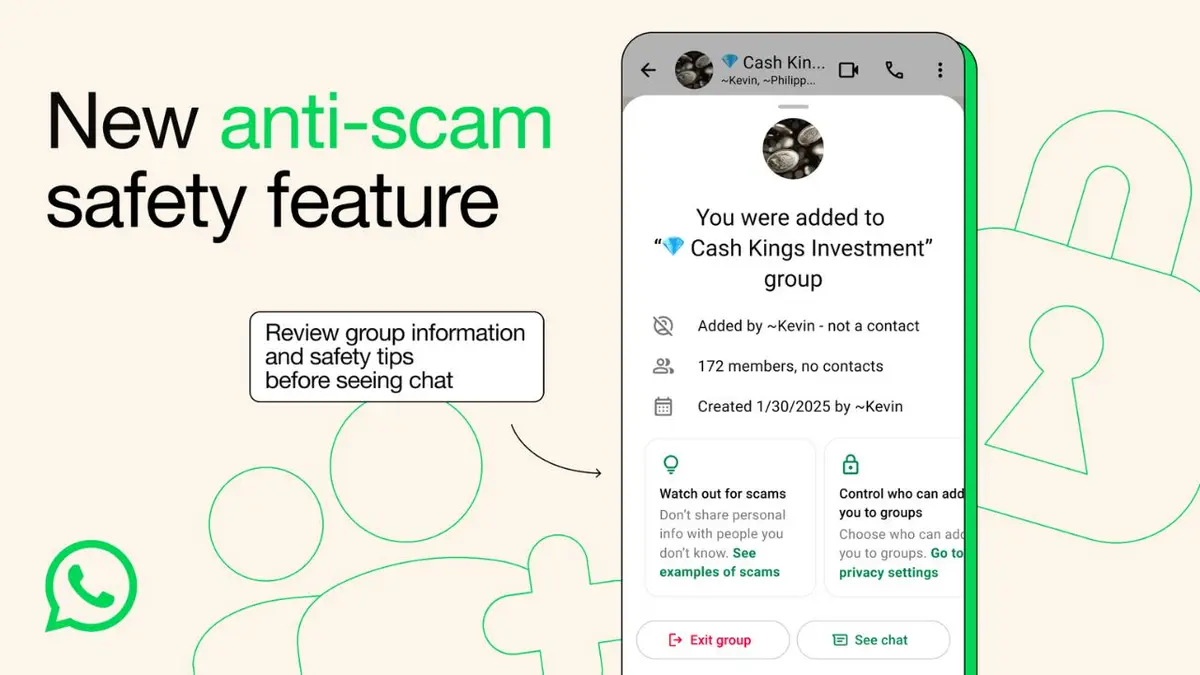

Online scams targeting social media and messaging platforms have become increasingly sophisticated in recent years. Knowing how to protect WhatsApp and Instagram accounts from scams is now essential for anyone who uses these platforms for communication, business, education, or entertainment. Cybercriminals are using fake links, impersonation tactics, phishing messages, and account takeover methods to steal personal information and gain unauthorized access.
While WhatsApp and Instagram continue to introduce new security features, users remain the first line of defense. Understanding common scam techniques and following basic cybersecurity practices can significantly reduce the risk of becoming a victim.
Why WhatsApp and Instagram Scams Are Increasing
WhatsApp and Instagram have billions of users worldwide, making them attractive targets for cybercriminals. Scammers often exploit trust, urgency, and curiosity to trick people into sharing personal information or login credentials.
Common scams include:
• Fake account verification messages
• Fraudulent giveaway campaigns
• Investment and cryptocurrency scams
• Impersonation of friends or family members
• Job offer scams
• Fake customer support accounts
Many attacks do not rely on technical hacking. Instead, they use social engineering techniques that manipulate users into voluntarily revealing sensitive information.
Recognizing these tactics is the first step toward protecting your accounts.
Enable Two-Factor Authentication for Better Security
One of the most effective ways to secure WhatsApp and Instagram accounts is enabling two-factor authentication (2FA).
Two-factor authentication adds an extra layer of protection beyond a password. Even if a scammer obtains login credentials, they may still be unable to access the account without the additional verification code.
For WhatsApp, users can activate a six-digit PIN through the app’s security settings. Instagram also offers authentication through security codes or approved authentication applications.
Cybersecurity experts consistently recommend enabling 2FA because it significantly reduces the likelihood of unauthorized account access.
Users should also avoid sharing authentication codes with anyone, including individuals claiming to represent platform support teams.
Beware of Phishing Links and Fake Messages
Phishing remains one of the most common threats on both platforms.
Scammers frequently send messages claiming that an account will be suspended, verified, or rewarded unless immediate action is taken. These messages often contain malicious links designed to steal login credentials.
Before clicking any link:
• Check the sender’s identity
• Look for spelling mistakes and unusual language
• Verify requests through official channels
• Avoid entering passwords on unfamiliar websites
Legitimate companies generally do not request passwords, verification codes, or financial information through direct messages.
A few seconds of verification can prevent significant account security issues.
Protect Personal Information and Privacy Settings
Strong privacy settings can limit opportunities for scammers to gather information about potential targets.
Users should review account privacy controls regularly and restrict unnecessary public access to:
• Phone numbers
• Email addresses
• Personal details
• Location information
• Family information
Instagram users can make their profiles private if they prefer greater control over who views their content. WhatsApp also allows users to limit visibility of profile photos, status updates, and last-seen information.
Reducing publicly available personal information makes it more difficult for scammers to create convincing impersonation attacks.
How to Spot Account Impersonation Scams
Impersonation scams have become increasingly common on social media platforms.
In these scams, fraudsters create fake profiles using stolen photos and publicly available information. They then contact friends, family members, or followers requesting money, personal information, or verification codes.
Warning signs include:
• Newly created accounts using familiar names
• Requests for urgent financial help
• Unusual messages from known contacts
• Changes in communication style
If a friend or family member requests money or sensitive information through social media, verify the request through a phone call or another trusted communication method before responding.
Safe Practices for Business and Creator Accounts
Business owners, influencers, and content creators face additional risks because their accounts often have larger audiences and commercial value.
To improve account security:
• Use strong, unique passwords
• Enable login alerts
• Review connected applications regularly
• Remove unnecessary third-party access
• Assign account management carefully
Businesses should also educate employees who have access to social media accounts about phishing attacks and account security procedures.
A compromised business account can damage customer trust and brand reputation.
What to Do If Your Account Is Compromised
If you suspect unauthorized access, act immediately.
Recommended steps include:
• Change passwords immediately
• Enable or reset two-factor authentication
• Log out of active sessions
• Report the incident through official support channels
• Inform contacts about potential fraudulent activity
Quick action can help prevent further misuse of the account and reduce the likelihood of financial or personal losses.
Takeaways
• Enable two-factor authentication on WhatsApp and Instagram for stronger account protection.
• Never share passwords, OTPs, or verification codes with anyone.
• Be cautious of suspicious links, urgent messages, and fake giveaway offers.
• Regularly review privacy settings and monitor account activity for unusual behavior.
FAQ
Q1. What is the most effective way to protect a WhatsApp account?
Enabling two-factor authentication and never sharing verification codes are among the most effective security measures.
Q2. Can scammers hack Instagram accounts without knowing the password?
In some cases, scammers use phishing attacks or social engineering to obtain login credentials and bypass basic security protections.
Q3. How can I identify a fake Instagram account?
Look for unusual usernames, limited account history, copied profile photos, suspicious messages, and requests for money or personal information.
Q4. What should I do if I click a suspicious link?
Immediately change your password, review account activity, enable two-factor authentication, and scan your device for potential security issues.
(How to Protect WhatsApp and Instagram Accounts from Scams, WhatsApp Security Tips, Instagram Account Protection, Online Scam Prevention, Social Media Safety, Two-Factor Authentication, Phishing Scam Awareness, Cybersecurity Tips, Instagram Scam Detection, WhatsApp Privacy Settings)