
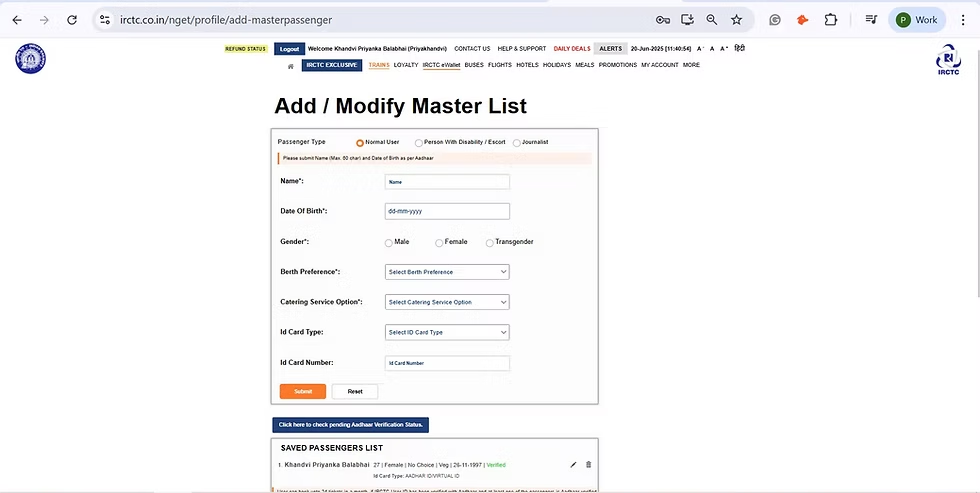

The IRCTC Master List is one of the most useful features for travellers who want to book confirmed train tickets quickly. By saving passenger details in advance, you can complete the booking process in seconds, which is especially valuable during Tatkal bookings when every second matters.
What Is the IRCTC Master List?
The IRCTC Master List is a built-in feature on the Indian Railway Catering and Tourism Corporation website and app that lets users store passenger information such as name, age, gender, berth preference, and ID details.
Instead of entering these details manually each time, you can select saved passengers while booking. This reduces typing errors and saves crucial time when tickets open for booking.
The feature is available to all registered IRCTC users and can be updated or deleted at any time.
Why the Master List Helps You Get Confirmed Tickets
Train tickets on popular routes such as Mumbai to Delhi, Pune to Goa, or Patna to Bengaluru often sell out within minutes. During Tatkal booking, the demand is even higher.
Using the IRCTC Master List shortens the time needed to fill in passenger details. That gives you a better chance of reaching the payment page before seats are exhausted.
While the Master List does not guarantee a confirmed ticket, it significantly improves booking speed, which can make a real difference on high-demand routes.
How to Create a Master List on IRCTC
Setting up the IRCTC Master List takes only a few minutes.
Log In to Your IRCTC Account
Open the official IRCTC website or mobile app and sign in.
Go to My Profile
Select the “My Account” or “My Profile” section.
Open Master List
Click on the “Master List” option.
Add Passenger Details
Enter each passenger’s name, age, gender, berth preference, senior citizen status, and ID information if required.
Save the List
Once saved, the details will be available for future bookings.
You can create entries for family members, friends, and frequent travel companions.
How to Use the Master List During Ticket Booking
After selecting your train and class, move to the passenger details page.
Choose the “Add From Master List” option and select the saved passengers. Their details will be filled in automatically.
This allows you to proceed directly to captcha verification and payment, saving valuable time during Tatkal hours.
Best Time-Saving Tips for Tatkal Booking
The IRCTC Master List works best when combined with other smart booking habits.
Keep Payment Options Ready
Use fast payment methods such as UPI, net banking, or saved cards.
Log In Before Booking Opens
Tatkal bookings start at specific times depending on travel class. Sign in several minutes early.
Use a Stable Internet Connection
A reliable connection reduces the risk of timeouts.
Update Passenger Details in Advance
Ensure age and identification details are accurate before the booking day.
How Many Passengers Can Be Added to Master List?
IRCTC allows users to save multiple passenger profiles. This is useful for families or individuals who frequently travel with the same group.
However, booking limits and ticket rules still apply as per railway regulations.
Common Mistakes to Avoid
Even with the Master List, errors can lead to failed bookings.
Avoid these common issues:
- Incorrect age or gender details
- Outdated passenger information
- Expired identity documents
- Slow payment processing
- Logging in at the last minute
Review your saved profiles regularly to ensure accuracy.
Is the IRCTC Master List Available on Mobile App?
Yes. The feature is available on both the IRCTC website and mobile app. Many users prefer setting it up on a desktop and using it later on either platform.
The saved data syncs with your account, so you can access it from any device after logging in.
Who Should Use the IRCTC Master List?
The feature is particularly useful for:
- Tatkal ticket bookings
- Senior citizen travel
- Family vacations
- Frequent business trips
- Festival season reservations
Anyone who books train tickets regularly can benefit from it.
Takeaways
- The IRCTC Master List saves passenger details for faster booking.
- It improves your chances of securing confirmed and Tatkal tickets.
- The feature is free and available on both website and app.
- Combining it with quick payment methods can further reduce booking time.
Frequently Asked Questions
Does the IRCTC Master List guarantee a confirmed ticket?
No. It only helps you complete the booking process faster.
Is the Master List free to use?
Yes. All registered IRCTC users can access it without any additional cost.
Can I edit saved passenger details?
Yes. You can update or delete entries anytime.
Is the Master List useful for Tatkal bookings?
Yes. It is especially valuable during Tatkal bookings when tickets sell out within minutes.