
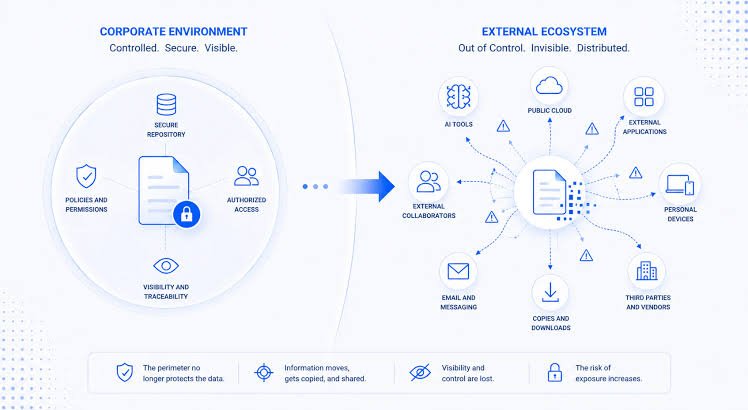

AI tools can help users summarise documents, extract information, translate files and complete everyday tasks, but uploading sensitive personal documents can create privacy and security risks. Aadhaar cards, PAN cards, passports, bank statements, certificates and legal records should therefore be handled carefully before being shared with an AI service.
Why Personal Documents Need Extra Protection
Using AI to work with a document can be convenient. A user may upload a PDF to summarise it, ask an AI assistant to extract information from a form or use an image tool to read text from an identity document.
The concern is not that every AI service will automatically misuse uploaded information. The important issue is understanding what information is being shared, where it is processed, how long it may be retained and what controls the particular service provides.
The OWASP GenAI Security Project identifies sensitive information disclosure as a major risk for large language model applications. Its examples of sensitive information include personally identifiable information, financial details, health records, confidential business information, security credentials and legal documents.
For Indian users, this makes document handling particularly important because many commonly used documents contain multiple pieces of identifying information in one place.
Identify Sensitive Information Before Uploading
The first step is to decide whether an AI tool actually needs the complete document.
A document may contain more information than the AI needs to perform a particular task. For example, if you want an AI tool to explain the wording of a bank statement, you may not need to provide your full account number, address or other identifying information.
Similarly, someone asking an AI tool to improve the language of a certificate application may only need to provide the relevant text rather than uploading the entire document.
Sensitive information can include Aadhaar numbers, PAN details, passport numbers, bank account information, card numbers, signatures, addresses, phone numbers, email addresses, medical records and passwords.
The basic principle is simple: share the minimum information required to complete the task.
Remove Aadhaar and PAN Details Where Possible
Government-issued identity documents deserve particular caution because they combine identifying information with other personal details.
If an AI tool only needs to understand the format or wording of a document, consider creating a copy and masking information that is not required.
For example, instead of uploading a document showing a complete Aadhaar number, replace the unnecessary digits with Xs before uploading it. Similar redaction can be used for PAN numbers, account numbers, phone numbers and residential addresses when those details are irrelevant to the task.
Do not rely on simply covering information with a shape or highlight if you are sending the original editable file. A proper redaction method should remove or permanently obscure the underlying information.
The objective is to ensure that unnecessary personal data never reaches the AI service in the first place.
Check How the AI Service Handles Your Data
Before uploading a sensitive file, read the service’s privacy policy and settings related to data use, retention and model improvement.
Different AI products can have different policies. Some may provide settings that allow users to control whether conversations or uploaded information can be used for improving services, while business or enterprise products may offer different data-handling arrangements.
Do not assume that every AI tool follows the same rules.
OWASP recommends transparency around data usage, retention and deletion, along with appropriate controls for sensitive information. It also recommends data sanitisation before information is used with AI systems.
This is particularly relevant when an AI tool is free or unfamiliar. A convenient interface does not tell you how the underlying service processes or stores submitted information.
Avoid Uploading Passwords and Security Credentials
Passwords, PINs, authentication codes, recovery codes, API keys and similar credentials should not be pasted into an AI chatbot for convenience.
These credentials are different from ordinary personal information because possession of the information can potentially provide direct access to an account or system.
The same rule applies to workplace credentials. Employees should not paste confidential login information, database credentials or private access tokens into public AI tools.
OWASP’s security guidance specifically identifies security credentials as sensitive information and recommends strong access controls and limiting the data available to AI systems.
If an AI tool asks for information that appears unnecessary for the task, stop and consider whether there is another way to accomplish the same objective.
Be Careful With AI Image and OCR Tools
AI tools that read photographs, scans and PDFs can make document processing much easier. They can extract text from receipts, forms, certificates and handwritten pages.
The convenience can also make it easy to forget how much information is contained in an image.
Before uploading a photograph, inspect the entire frame. A picture of one document may also reveal another document, a home address, a computer screen, a vehicle registration number or other information in the background.
Crop the image to the relevant section when possible.
If you only need an AI tool to read a particular paragraph, uploading a full photograph of the document may expose considerably more information than necessary.
Don’t Upload Workplace Confidential Documents
The same precautions apply to professional documents.
Employees may use AI tools to summarise contracts, edit reports, analyse spreadsheets or draft emails. However, company documents can contain customer information, financial data, internal strategies, unpublished results and trade secrets.
OWASP lists confidential business information among the types of sensitive information that can be exposed through AI applications.
Before uploading workplace material, check your employer’s AI policy. Some organisations permit approved AI systems for specific tasks while restricting public or consumer AI services.
If your organisation provides an approved AI platform, follow its data-handling rules instead of moving confidential files to an unrelated service.
Use Redaction Instead of Blur When Necessary
A common mistake is assuming that visually hiding information always removes it.
For sensitive documents, use a proper redaction process rather than placing a black rectangle over text in an editable document or using a reversible blur.
The goal is to create a new version of the document where the original sensitive information cannot be recovered from the file.
For PDFs, images and office documents, check the resulting file before uploading it. Try selecting text, copying it or opening the document in another viewer where appropriate.
This extra check matters because the visible appearance of a document is not always the same as the data contained inside its file structure.
Be Careful With Connected AI Tools
Some AI applications can connect with email, cloud storage, calendars, document repositories and other services.
These integrations can be useful, but they also increase the amount of information an AI application may be able to access.
OWASP’s guidance recommends restricting AI systems to the data and external sources they actually need and applying least-privilege access controls.
If an AI application asks for access to an entire drive when you only need help with one document, review the permissions before accepting.
Remove integrations that you no longer use and regularly check which third-party applications have access to your accounts.
India’s Data Protection Framework Is Evolving
India has established the Digital Personal Data Protection framework, and the Ministry of Electronics and Information Technology published the Digital Personal Data Protection Rules, 2025, along with an enforcement timeline in November 2025.
However, users should not treat the existence of a data protection framework as a substitute for personal security practices.
The safest approach remains to minimise the information shared, understand the service being used and avoid providing sensitive information when it is not necessary.
Privacy protection starts before the upload button is pressed.
What to Do If You Accidentally Upload Sensitive Data
If you accidentally submit a document containing sensitive information, first check the AI service’s available privacy, conversation-management and deletion controls.
If the document contains passwords or other credentials, change them promptly through the relevant official service.
For financial information, monitor accounts and contact the financial institution through its official channels if you suspect misuse.
Also review other information that may have appeared in the uploaded file. A single document can contain multiple identifiers, so the response should not focus only on the most obvious piece of information.
If you suspect that personal information has been compromised, document what was shared and when, then follow the relevant service provider’s reporting and security procedures.
A Simple AI Document Safety Checklist
Before uploading any personal document, ask five questions: Does the AI actually need the complete file? Can unnecessary information be removed? Do I understand how the service handles uploaded data? Am I using an approved or trustworthy service? Could this information cause harm if exposed?
If the answer to any of these questions raises concern, do not upload the original document.
Create a sanitised copy instead, or perform the task without sharing the sensitive information.
AI can be useful for working with documents, but convenience should not override basic data-security practices.
Key Takeaways
- Upload only the information an AI tool genuinely needs for the task.
- Mask or permanently redact Aadhaar, PAN, financial and other sensitive details when they are unnecessary.
- Never share passwords, OTPs, PINs, API keys or confidential access credentials with an AI chatbot.
- Check privacy settings, data-use policies and third-party permissions before submitting personal or workplace documents.
FAQs
Is it safe to upload Aadhaar or PAN cards to AI tools?
It depends on the specific service and how it handles uploaded information, but users should avoid sharing complete identity documents unless there is a genuine need. Mask unnecessary numbers and personal information before uploading a document.
Can AI tools store uploaded documents?
Data-handling practices vary between AI services and products. Users should check the provider’s current privacy policy and settings covering retention, deletion and use of submitted information. OWASP recommends transparency around these practices.
Should I upload my bank statement to an AI chatbot?
Avoid uploading a complete bank statement when the task can be completed with less information. Remove account numbers, addresses, transaction details and other data that the AI does not need.
What information should never be shared with an AI chatbot?
Avoid sharing passwords, OTPs, UPI PINs, card PINs, authentication credentials, private encryption keys and similar secrets. Confidential company information and highly sensitive personal records should also only be processed through services and workflows approved for that type of data.