

Festive sales on Indian e-commerce platforms often combine product discounts with bank offers, EMI benefits and membership perks. Before placing an order, shoppers should check whether their card, transaction type, product and purchase value actually qualify for the advertised bank discount.
Why Bank Offer Eligibility Matters During Festive Sales
Bank offers can reduce the effective price of smartphones, laptops, appliances, fashion products and other purchases during major festive shopping events. However, an offer shown on a sale page does not automatically apply to every customer or every product.
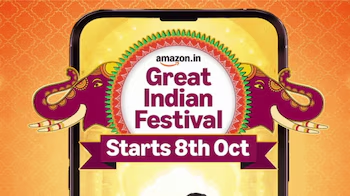
Amazon has announced that its Great Indian Festival 2026 will begin on October 8, with a 10% instant discount on SBI Credit and Debit Cards and eligible EMI transactions. Amazon also says Prime members can receive up to 10% additional savings on select offers.
Flipkart has also announced Big Billion Days 2026, with early access beginning October 8 and the main sale starting October 9.
For shoppers, the important question is not simply whether a bank offer exists. It is whether their particular transaction qualifies.
Check Which Bank and Card Are Eligible
The first step is to identify the bank named in the offer. Festive sale discounts are usually linked to specific banks and specific card categories.
For example, Amazon’s announced Great Indian Festival offer specifically mentions SBI Credit and Debit Cards and eligible EMI transactions. That means holding a card from another bank does not make a customer eligible for this particular advertised discount.
Flipkart’s festive-sale arrangements can involve different banking partners and card products. The platform currently lists Axis Bank, HDFC Bank, State Bank of India and ICICI Bank among its EMI banking partners.
Before shopping, open the complete offer terms and check:
- Bank name
- Credit or debit card requirement
- Whether EMI transactions qualify
- Whether corporate or commercial cards are excluded
- Minimum transaction value
- Maximum discount
- Offer validity period
- Eligible products or categories
These details can change from one sale to another.
Check the Minimum Purchase Value
A common condition attached to festive bank offers is a minimum transaction value.
For instance, previous Flipkart Big Billion Days bank offers have used different minimum purchase requirements depending on the product category. Axis Bank’s published terms for an earlier Big Billion Days offer specified separate thresholds for categories such as groceries, mobiles, fashion and other products.
This means a customer should not assume that a 10% discount will apply to a small purchase simply because the card is eligible.
Suppose an offer requires a minimum transaction of ₹5,000. A customer buying an eligible ₹4,500 product may not receive the bank discount even if the same product page displays the bank offer.
The minimum amount should therefore be checked before payment, not after the order is placed.
Check Whether Your Product Qualifies
Bank offers are not necessarily applicable to every item listed during a sale.
E-commerce platforms can exclude certain sellers, brands, categories or products. Some offers may also have separate terms for mobile phones, electronics, groceries, fashion or travel bookings.
Flipkart’s current shopping information advises customers to check the offer details associated with the product and notes that No Cost EMI is available only on select products and categories.
Amazon’s Great Indian Festival announcement also distinguishes between different types of savings, including bank discounts, No Cost EMI, exchange offers, Buy More Save More and other promotions.
Before checkout, shoppers should look for the bank-offer section on the product page and verify that the exact item qualifies.
Check the Payment Method Before Checkout
Another important eligibility factor is how the payment is made.
A bank discount may require direct payment using an eligible credit or debit card. Certain payment routes, wallets or third-party payment methods may not qualify.
For example, published Axis Bank terms for earlier Flipkart offers specifically excluded some payment methods and stated that eligibility depended on using an eligible Axis Bank card for the qualifying purchase.
This is why shoppers should select the intended card at checkout and check whether the discount appears before completing the transaction.
If the discount is not reflected at the payment stage, the customer should review the offer conditions rather than assuming that the discount will be credited later.
Understand EMI and No Cost EMI Conditions
EMI offers can make festive purchases more affordable, but shoppers should distinguish between regular EMI, bank EMI discounts and No Cost EMI.
A bank offer may apply only to eligible EMI transactions. Other offers may be available only on non-EMI transactions. The exact condition depends on the sale and bank.
No Cost EMI also does not necessarily mean there are no associated costs of any kind. Processing fees, taxes or other applicable charges can depend on the lender and transaction.
Flipkart currently lists No Cost EMI among its payment options for selected products and says terms and conditions apply.
Before choosing EMI, customers should check the total payable amount, processing fee, tenure and monthly instalment rather than looking only at the advertised discount.
Check the Maximum Discount Limit
The phrase 10% off does not necessarily mean an unlimited 10% reduction.
Most bank promotions have a maximum discount amount. For example, a 10% offer capped at ₹1,500 would provide the full ₹1,500 benefit once the qualifying purchase reaches the relevant threshold, rather than continuing to increase with a larger order.
Previous Axis Bank Big Billion Days terms included maximum savings limits per card, while earlier ICICI Bank festive offers also specified maximum discount amounts.
Shoppers should therefore calculate the actual saving rather than applying the percentage directly to the full product price.
Check Membership and Early Access Rules
Some festive sales offer additional benefits to platform members.
Flipkart currently describes different Plus membership levels and says eligible members can receive early sale access and additional benefits. Its website also lists separate benefits for Flipkart Black members.
For Big Billion Days 2026, Flipkart has confirmed early access from October 8.
Amazon’s Great Indian Festival 2026 will also provide additional savings for Prime members on select offers.
Therefore, shoppers should check whether the advertised price or discount is available to everyone or only to members of a particular programme.
A Simple Eligibility Checklist Before Paying
Before completing a festive sale purchase, check these seven points:
- Is my bank listed in the offer?
- Is my exact credit or debit card eligible?
- Does the product qualify?
- Have I met the minimum transaction value?
- Is my selected payment method eligible?
- Have I checked the maximum discount limit?
- Does the final checkout price show the expected benefit?
If all seven conditions are satisfied, the customer can proceed after reviewing the complete terms and conditions.
Takeaways
- Festive bank discounts usually depend on the bank, card type, product and transaction conditions.
- A displayed percentage discount may have a minimum purchase requirement and maximum savings cap.
- EMI, No Cost EMI and regular card payments can have different eligibility rules.
- Always verify the discount at checkout and read the applicable terms before paying.
FAQs
How can I know if my card is eligible for a festive sale offer?
Check the bank name, card type and transaction requirements listed in the offer’s terms and conditions. Also verify the offer at checkout before completing payment.
Do bank offers apply to every product in a sale?
No. Some offers can be restricted to selected products, categories, sellers or brands. The product page and offer terms should be checked before purchase.
Can I use a bank offer with EMI?
It depends on the specific promotion. Some bank offers include eligible EMI transactions, while others may apply only to non-EMI payments.
Why is my bank discount not showing at checkout?
Possible reasons include an ineligible card, failure to meet the minimum transaction value, an excluded product, an unsupported payment method, or the offer having reached its limit or validity period.