

Heavy monsoon rains can damage smartphones through water exposure, humidity, and accidental drops. By following a few preventive measures and knowing what to do if your phone gets wet, you can extend its lifespan and avoid expensive repairs during the rainy season.
How to Protect Your Smartphone During Heavy Monsoon Rains
Protecting your smartphone during heavy monsoon rains is essential because water damage remains one of the most common causes of device failure. Even though many modern smartphones come with water resistance ratings, they are not completely waterproof. Heavy rain, flooded roads, high humidity, and accidental splashes can still affect your phone’s performance and internal components. Taking a few precautions before stepping outdoors can help you avoid data loss, repair costs, and unexpected device failures.
For people who commute daily, travel on two-wheelers, or work outdoors, monsoon protection is just as important as using a sturdy phone case or screen protector.
Understand the Difference Between Water Resistant and Waterproof
One of the biggest misconceptions is that a water-resistant phone can survive any kind of water exposure. In reality, most smartphones are tested under controlled laboratory conditions using fresh water. These tests do not account for muddy water, rain mixed with dust, salt water, or pressure caused by flowing water.
Many premium smartphones carry IP67 or IP68 ratings, which indicate resistance to water and dust under specific conditions. However, manufacturers generally do not cover liquid damage under standard warranties.
Budget and mid-range smartphones may offer splash resistance but should not be exposed to heavy rainfall unless specifically stated by the manufacturer.
Understanding your phone’s IP rating can help you use it more safely during the monsoon.
Use a Waterproof Pouch or Protective Case
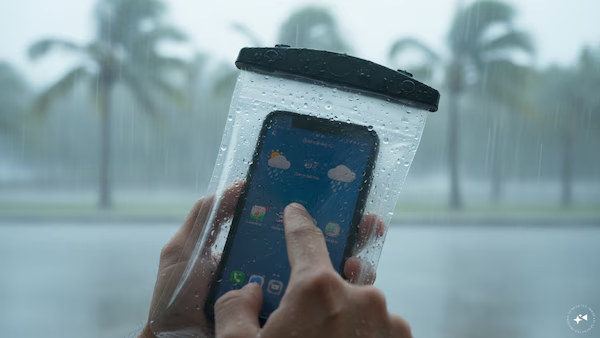
A waterproof mobile pouch is one of the simplest and most effective accessories for the rainy season. These transparent pouches allow users to operate the touchscreen while keeping rainwater away from the device.
If you frequently travel by bike or walk in the rain, consider carrying your phone inside a waterproof zip pouch before placing it in your bag or pocket.
For additional protection, use a high-quality protective case with raised edges. Besides shielding the phone from rain, it also reduces damage if the device slips from your hands on wet surfaces.
Avoid storing your smartphone in loose shirt pockets during heavy rain, as water can easily seep inside.
Keep Charging Ports and Openings Dry
The charging port, speaker grills, SIM tray, and microphone openings are the most vulnerable areas of a smartphone during wet weather.
Before charging your phone, ensure that the USB port is completely dry. Charging a device while moisture is present can damage the charging connector and, in some cases, trigger safety warnings that temporarily disable charging.
If your phone displays a moisture detection notification, disconnect the charger immediately and allow the device to dry naturally before attempting to charge it again.
Avoid inserting cotton buds, tissue paper, or sharp objects into the charging port, as they may damage the internal connectors.
Avoid Using Your Phone in Heavy Rain
Using a smartphone during intense rainfall increases the risk of water entering through ports, buttons, and speaker openings.
Rainwater can also make the touchscreen less responsive, leading to accidental taps or drops. If you must answer an important call, move to a covered area whenever possible.
Bluetooth earphones or smartwatches can help reduce the need to remove your phone during bad weather.
If you use your phone for navigation while riding a motorcycle, ensure that it is mounted inside a waterproof mobile holder specifically designed for rainy conditions.
What to Do If Your Smartphone Gets Wet
Quick action can reduce the chances of permanent damage.
Immediately switch off the device if it is still powered on. Remove the protective cover, SIM card tray, and memory card if possible. Gently wipe the exterior using a soft microfiber cloth.
Allow the phone to dry naturally in a well-ventilated place.
Avoid using hair dryers, microwave ovens, direct sunlight, or high heat to dry the phone, as excessive temperatures can damage internal components.
Contrary to popular belief, placing a wet smartphone in a container of uncooked rice is not considered a reliable repair method. Many smartphone manufacturers and repair experts recommend allowing the device to air dry or using silica gel packets if available, as rice may leave dust particles inside ports without effectively removing moisture.
If the phone does not function normally after drying, visit an authorized service center instead of attempting repairs yourself.
Protect Your Data Before the Monsoon
Water damage can sometimes make a phone temporarily or permanently inaccessible. Regular backups help ensure that important files are not lost.
Enable automatic cloud backup for:
- Photos and videos
- Contacts
- Messages
- Documents
- App data where supported
Keeping software updated also improves device security and performance during daily use.
If your phone supports emergency SOS features, ensure they are properly configured before the rainy season, especially if you travel frequently.
Small Precautions Can Prevent Expensive Repairs
Most monsoon-related smartphone damage occurs because users underestimate light rain or continue using wet devices without drying them properly.
Simple habits such as carrying a waterproof pouch, avoiding charging while moisture is present, checking weather forecasts before travel, and backing up important data can significantly reduce the risk of costly repairs.
Whether you own an entry-level smartphone or a flagship model, preventive care remains the best way to protect your device throughout the monsoon season.
Takeaways
- Water-resistant smartphones are not completely waterproof and should still be protected during heavy rain.
- Waterproof pouches and quality protective cases offer effective defense against rain and accidental splashes.
- Never charge a phone while the charging port is wet or showing a moisture warning.
- If your phone gets wet, switch it off, dry it naturally, and seek professional repair if problems persist.
FAQ
Q1. Can I use my smartphone in heavy rain if it has an IP68 rating?
An IP68 rating offers strong water resistance under specific test conditions, but prolonged exposure to heavy rain or dirty water is still not recommended.
Q2. Is putting a wet phone in rice a good idea?
No. Most manufacturers and repair professionals do not recommend this method. Air drying in a ventilated area or using silica gel packets is generally more effective.
Q3. Can charging a wet phone damage it?
Yes. Charging while moisture is present in the charging port may damage the connector or trigger the phone’s moisture protection system.
Q4. What is the best way to carry a smartphone during the monsoon?
A waterproof mobile pouch or waterproof compartment inside a bag provides the safest protection during heavy rainfall.