
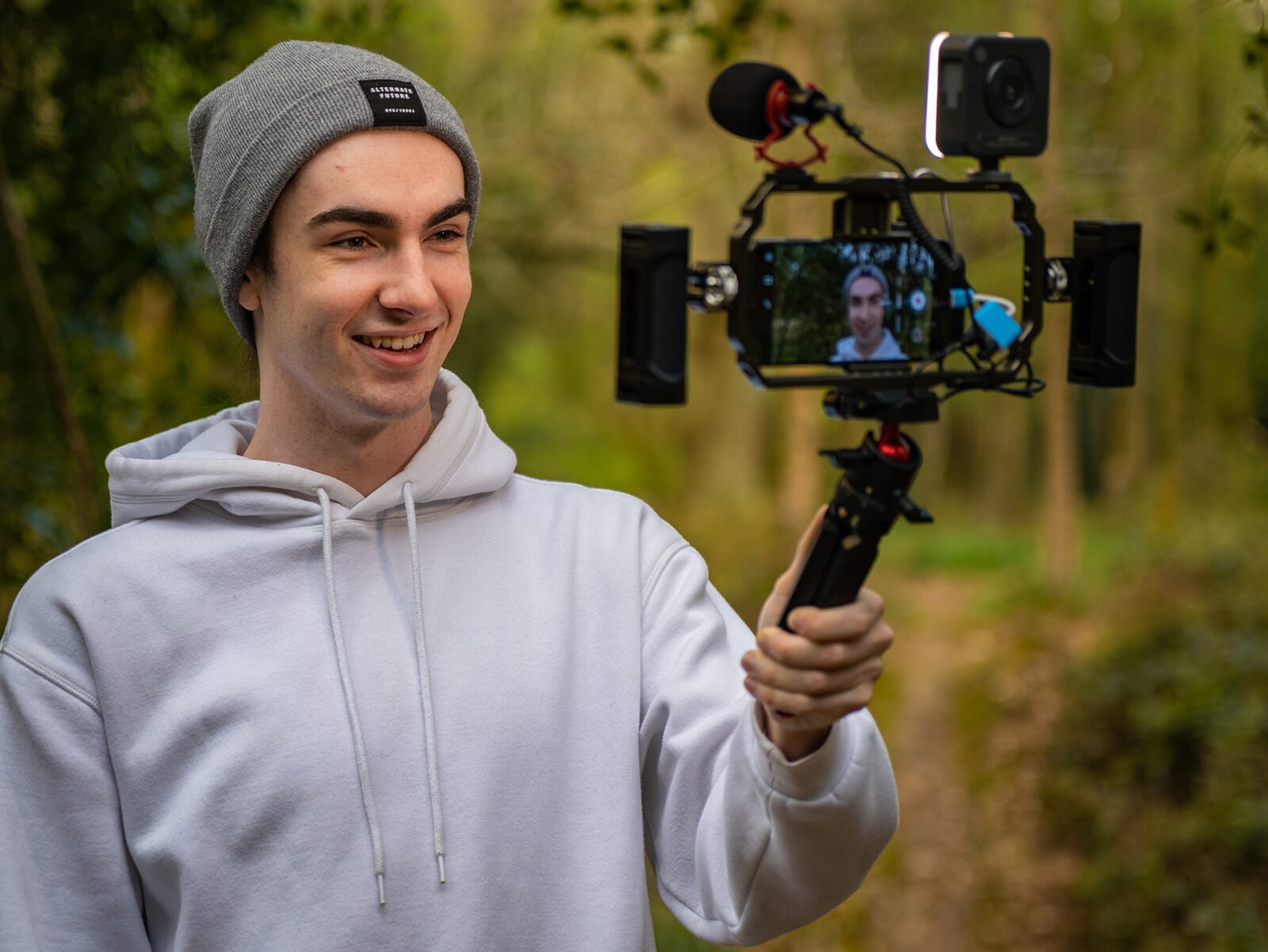

Creating a professional YouTube video rig with a smartphone is an evergreen topic and does not depend on time sensitive news. This guide explains how a smartphone YouTube rig works, which accessories matter most and how to build a budget friendly setup with practical steps.
A smartphone YouTube rig helps new creators produce stable, well lit and clear sounding videos without expensive gear. The main keyword smartphone YouTube rig appears naturally so readers understand the focus immediately. Most steps rely on affordable accessories and simple workflow changes that dramatically improve production quality.
Choose the right smartphone settings for video quality
Before adding accessories, optimise the phone itself. Set your camera app to record in 1080p at 30 frames per second, which is ideal for most content and avoids unnecessary file size inflation. If the phone supports 4K and has strong storage, you can record selected shots in higher resolution for B roll. Lock exposure and focus so the camera does not adjust brightness mid shot. Turn on grid lines to frame subjects consistently. Clean the lens before every shoot to prevent haze and micro smudges that reduce sharpness. These small adjustments improve video quality immediately without spending money.
Select essential accessories for stability and framing
Stability is the foundation of a professional looking smartphone YouTube rig. Use a compact tripod that supports both table top shooting and full standing height. A strong phone mount with a cold shoe slot helps attach accessories later. For handheld shooting, add a basic grip or cage so the phone is easier to handle and less shaky. Avoid bulky stabilisers unless you shoot in motion regularly. Most creators can rely on a good tripod with a swivel head to adjust angles quickly. Stable framing keeps the video clean and improves watch time on mobile screens.
Use clear audio equipment to improve viewer retention
Audio quality often matters more than video quality for YouTube audiences. A wired lapel microphone is a low cost solution that gives clear voice pickup and avoids echo. Clip it slightly below the neckline and keep the cable out of frame. If you shoot outdoors or record interviews, a compact shotgun microphone can attach to the phone mount using the cold shoe. Test sound levels before recording to ensure background noise is manageable. Placing soft materials like cushions behind the camera can reduce reflections in small rooms. Clean, consistent audio strengthens credibility and helps viewers stay engaged.
Add simple lighting tools for sharp and natural looking visuals
Even advanced phones struggle in poor lighting, so a budget friendly light source is essential. A small LED panel with adjustable brightness creates soft, even light. Position it at a 45 degree angle to avoid harsh shadows. If you shoot in natural light, face a window and use a white curtain to diffuse sunlight. For nighttime or indoor setups, add a second light behind you to separate the subject from the background. Good lighting reduces grain, improves skin tone and makes the entire frame look more professional.
Build an efficient shooting workflow for consistent content
A smartphone YouTube rig becomes effective when paired with a structured workflow. Create a fixed shooting corner so you do not reset the setup every time. Mark tripod height and table placement for repeatability. Keep a checklist that includes battery level, storage, frame composition and lighting position. Use airplane mode during recording to prevent notifications from interrupting shots. For script management, place short bullet points behind the camera to maintain eye line and reduce retakes. This workflow saves time and ensures a predictable output.
Use editing apps to polish videos without a laptop
Modern phones support editing apps that can handle cuts, transitions, music and color correction. Use a simple timeline based editor that exports in 1080p. Trim silent sections and remove awkward pauses. Adjust brightness and contrast slightly to match your lighting setup. Avoid heavy filters that distort skin tone. Insert captions for sections where viewers may watch without sound. Keeping the edit clean and minimal makes the video more professional and increases clarity on mobile devices.
Scale the setup as your channel grows
A budget smartphone YouTube rig is enough for the first several months of content creation. As your channel grows, upgrade only where needed. Replace the basic tripod with a sturdier one, add a more powerful LED panel or switch from a wired microphone to a compact wireless system. If you shoot outdoors frequently, add a small wind muff for protection. These incremental upgrades keep the rig lightweight and cost efficient while improving production quality.
Takeaways
Optimising phone settings delivers immediate quality improvements
Stable framing and clear audio matter more than high resolution
Simple lighting tools make smartphone footage look professional
A repeatable workflow saves time and keeps output consistent
FAQs
Is a smartphone enough to start a YouTube channel
Yes. Modern phones record high quality video and, with basic accessories, can match entry level camera setups for most formats.
Do I need 4K to look professional on YouTube
No. Most viewers watch on mobile screens and 1080p is sufficient. Use 4K only if your phone handles it smoothly.
What is the most important budget accessory
A lapel microphone is the first essential upgrade because audio clarity has the strongest impact on viewer retention.
Can I shoot indoor videos without buying lights
You can use window light with natural diffusion, but a small LED panel gives more control and consistency.