
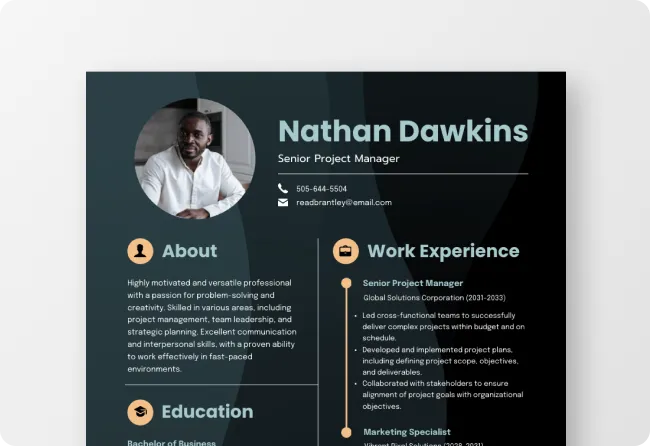

Using AI tools to create professional resumes for free has become one of the easiest ways for job seekers to prepare polished, ATS-friendly resumes without hiring a resume writer. Whether you are a fresher, an experienced professional, or someone changing careers, free AI resume builders can help you organize your skills, improve wording, and create a professional document within minutes.
The job market has become increasingly competitive, and recruiters often spend only a few seconds scanning each resume before deciding whether to move a candidate to the next stage. At the same time, many companies use Applicant Tracking Systems (ATS) to filter resumes before a recruiter even sees them. AI-powered resume tools are designed to help applicants create resumes that are clear, structured, and relevant to modern hiring practices.
This guide explains how to use free AI tools effectively while ensuring your resume remains accurate, personalized, and suitable for your target job.
Is This Topic News or Evergreen?
This is an evergreen educational topic. AI resume builders continue to evolve, but the process of using AI to draft, refine, and optimize resumes remains relevant for students, fresh graduates, professionals, and career changers. The advice below is based on widely accepted resume-writing practices and current AI capabilities.
Why AI Resume Builders Are Becoming Popular
AI has simplified resume writing by reducing the time required to create a professional document.
Instead of starting from a blank page, users can enter their education, work experience, certifications, and skills into an AI-powered platform. The tool then organizes the information into a clean format, improves sentence structure, suggests stronger action verbs, and highlights achievements more effectively.
Many AI resume tools also recommend keywords based on the job role, making resumes more compatible with Applicant Tracking Systems. This can improve the chances of passing the initial screening process used by many employers.
However, AI should assist the writing process, not replace your own judgment. Every resume should reflect your genuine qualifications and experience.
Choose a Reliable Free AI Resume Tool
Several free AI-powered resume builders allow users to generate professional resumes without paying for basic features.
When selecting a platform, look for tools that offer:
- ATS-friendly templates
- AI writing assistance
- Grammar and spelling suggestions
- Download options in PDF format
- Resume customization for different industries
Some tools may limit advanced templates or premium features, but their free versions are often sufficient for creating a high-quality resume suitable for internships, campus placements, private sector jobs, and government recruitment where digital submissions are accepted.
Enter Accurate Career Information
The quality of an AI-generated resume depends entirely on the information you provide.
Include details such as:
- Full name and contact information
- Professional summary
- Educational qualifications
- Work experience
- Internships
- Technical skills
- Soft skills
- Certifications
- Projects
- Awards and achievements
Be honest while entering information. AI cannot verify facts, so exaggerating experience or adding skills you do not possess may create problems during interviews.
Instead of writing vague statements like “Hardworking team player,” provide measurable achievements wherever possible.
Customize Your Resume for Every Job
One of the biggest advantages of AI is its ability to adapt resumes for different positions.
Before generating your final resume, carefully read the job description and identify important skills and qualifications mentioned by the employer. AI tools can help rewrite your experience using relevant keywords, but you should ensure the final content accurately represents your background.
For example, a software developer applying for a data analyst role should highlight analytical skills, programming languages, and data visualization projects. A marketing professional may focus more on campaign management, content creation, and performance metrics.
Creating a customized resume for each application generally produces better results than sending the same resume everywhere.
Review AI Suggestions Carefully
AI is helpful, but it is not always correct.
Always review every section before downloading your resume.
Check for:
- Incorrect dates
- Repeated information
- Grammar mistakes
- Unnatural wording
- Generic phrases
- Formatting issues
Replace overly broad statements with specific achievements whenever possible.
For example, instead of writing “Responsible for sales,” write “Increased monthly sales by 18% through customer engagement initiatives.” Quantifiable achievements create a stronger impression.
Keep the Resume Simple and ATS-Friendly
Many job seekers believe colorful graphics and complex designs improve their resumes. In reality, simple layouts often perform better with Applicant Tracking Systems.
Use:
- Clear section headings
- Standard fonts
- Consistent formatting
- Bullet points
- Chronological work history
Avoid excessive graphics, tables, icons, text boxes, and decorative elements unless specifically required for creative roles such as graphic design.
A clean layout makes it easier for both software and recruiters to read your resume.
Proofread Before Submitting
Even after using AI, proofreading remains essential.
Read the resume yourself or ask a trusted friend or mentor to review it. Check whether contact details are correct, employment dates match your records, and project descriptions accurately reflect your work.
Saving your resume in PDF format before submitting it helps preserve formatting across different devices.
It is also useful to maintain multiple versions of your resume for different industries or job roles.
Common Mistakes to Avoid
Many applicants misuse AI by relying entirely on automatically generated content.
Avoid these common errors:
- Copying AI-generated text without editing.
- Adding skills you cannot demonstrate.
- Using the same resume for every application.
- Ignoring ATS compatibility.
- Including outdated contact information.
- Writing long paragraphs instead of concise bullet points.
AI should improve clarity and structure, but your experience and achievements should remain authentic.
Takeaways
- Use AI as a writing assistant, not as a replacement for your own experience.
- Customize your resume for each job using relevant keywords and achievements.
- Keep the layout simple, professional, and ATS-friendly.
- Always proofread the final resume before submitting job applications.
Frequently Asked Questions
Q1. Can AI create a professional resume for free?
Yes. Many AI-powered resume builders offer free features that help users draft, edit, and format professional resumes suitable for most job applications.
Q2. Are AI-generated resumes accepted by employers?
Yes. Employers generally evaluate the content and relevance of a resume, not whether AI assisted in writing it. The information must be truthful, accurate, and tailored to the role.
Q3. Can AI improve my chances of getting shortlisted?
AI can improve clarity, organization, grammar, and keyword optimization, which may help your resume perform better in Applicant Tracking Systems. However, it cannot guarantee interviews or job offers.
Q4. Should I use the same AI-generated resume for every application?
No. It is recommended to customize your resume for each position by highlighting the skills and experience most relevant to the specific job description.
(Primary Keyword: How to Use AI Tools to Create Professional Resumes for Free | Secondary Keywords: AI resume builder, free AI resume tools, ATS-friendly resume, resume writing with AI, AI CV maker, professional resume tips, job application resume, AI career tools)