

Small town sellers can use WhatsApp Business to build direct customer relationships and generate their first 100 orders without heavy investment. This guide explains setup, catalog creation, marketing tactics, and practical strategies that work in Tier-2 and Tier-3 markets.
Starting a WhatsApp Business store in small towns has become one of the most practical ways for local sellers to go digital. With WhatsApp’s widespread usage across India, even in low bandwidth areas, sellers can reach customers directly without relying on expensive marketplaces or websites.
Why WhatsApp Business Works for Small Town Sellers
The adoption of smartphones and affordable data has made WhatsApp the default communication platform in smaller cities. Unlike e-commerce platforms that require onboarding, commissions, and logistics setup, WhatsApp allows direct selling.
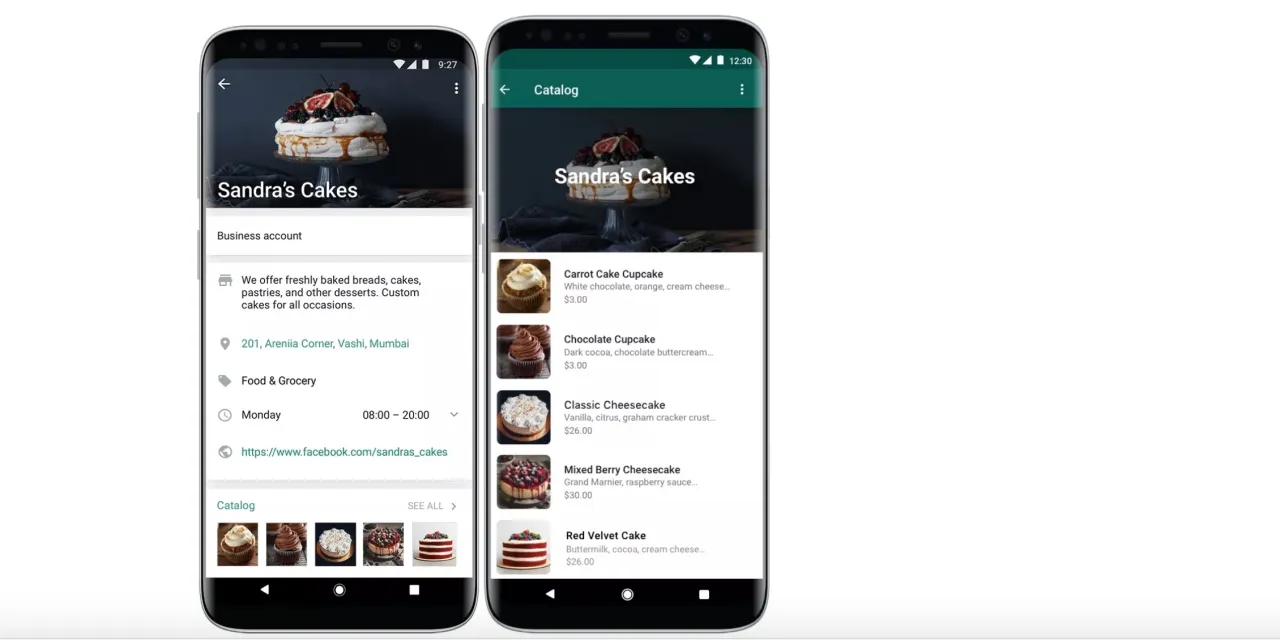
Using the WhatsApp Business app, sellers can create a professional presence with product catalogs, auto replies, and quick responses. Customers are more likely to trust a familiar chat interface rather than unknown websites.
In Tier-2 markets, trust and personal relationships still drive buying decisions. WhatsApp enables sellers to replicate offline interactions digitally by sharing product photos, answering queries, and negotiating prices in real time.
Setting Up WhatsApp Business Store Step by Step
To start, download WhatsApp Business and register using your mobile number. Choose a business name carefully because it cannot be changed later.
Next, complete your business profile by adding address, description, and working hours. This improves credibility when customers view your account.
The most important feature is the catalog. Add clear product images, pricing, and short descriptions. Avoid uploading low quality images as they directly impact conversion.
Enable quick replies for common questions like pricing, delivery time, and payment options. This saves time and creates a more professional experience.
Creating a Product Catalog That Converts Customers
A strong WhatsApp product catalog is essential to get initial orders. Focus on 10 to 20 best selling items instead of listing everything.
Use real photos instead of stock images. For example, a local clothing seller should click images of actual stock with proper lighting. This builds trust among buyers.
Keep descriptions simple and clear. Mention size, material, price, and delivery details. Avoid long paragraphs because most users skim content on mobile.
Grouping products into categories such as daily wear, festive offers, or combo deals can help customers browse easily and make quicker decisions.
How to Get First 100 Orders on WhatsApp
Getting the first 100 orders requires focused distribution rather than random posting. Start with your existing network including contacts, family groups, and local communities.
Share your catalog link in local WhatsApp groups such as housing societies, tuition groups, and city specific buy and sell groups. These groups are highly active in small towns.
Use status updates daily. Posting product images, offers, and testimonials on WhatsApp Status increases visibility without spamming chats.
Offer limited time deals to create urgency. For example, discounts on first 20 orders or free delivery within the city can push early conversions.
Another effective method is referral incentives. Encourage existing customers to refer others in exchange for small discounts.
Payment and Delivery Setup for Local Sellers
For payments, most small town sellers rely on UPI due to its ease of use. Apps like Google Pay and PhonePe are widely accepted and trusted.
Offer multiple payment options including cash on delivery if possible, especially in areas where digital payments adoption is still growing.
For delivery, start hyperlocal. Use local delivery partners, auto drivers, or self delivery within a limited radius. This reduces cost and ensures faster service.
As order volume increases, sellers can explore courier aggregators, but early focus should remain on local fulfillment.
Common Mistakes Small Sellers Should Avoid
Many sellers fail because they treat WhatsApp like a broadcast tool instead of a conversation platform. Sending bulk messages without personalization often leads to blocks.
Ignoring customer queries or responding late reduces trust. Quick response time is critical for conversions.
Another mistake is inconsistent posting. Sellers who do not update status or share new products regularly lose visibility.
Pricing should also be competitive. Since customers can easily compare options, overpriced products without clear value rarely convert.
Takeaways
- WhatsApp Business enables low cost digital selling in small towns
- Product catalog quality directly impacts conversions and trust
- Local networks and WhatsApp groups drive initial orders
- Fast response and consistent engagement are key to scaling sales
FAQs
Is WhatsApp Business free for sellers?
Yes, the app is free to use and offers essential tools like catalogs and auto replies without any cost.
How can I promote my WhatsApp store locally?
You can share your catalog in local groups, use status updates, and leverage word of mouth referrals.
Do I need a GST number to sell on WhatsApp?
Not always. Small sellers can start without GST, but it may be required as business scales depending on turnover and product category.
What products sell best on WhatsApp in small towns?
Daily use items, clothing, food products, and local specialty goods tend to perform well due to repeat demand.