

Planning a trip during the Independence Day weekend? Downloading and securely storing your DigiLocker documents before you travel can save time, prevent inconvenience during poor network connectivity, and help you access essential identity and vehicle records whenever required.
Travellers across India are expected to hit the roads, railways, and airports in large numbers during the Independence Day holiday. One simple step that can make your journey smoother is downloading your DigiLocker documents before travelling. While DigiLocker provides instant access to government-issued digital documents, having offline copies can be useful in areas with weak mobile connectivity or during unexpected technical issues.
Whether you are travelling by car, train, bus, or flight, here’s how you can prepare your digital documents safely and responsibly.
What Is DigiLocker and Why Is It Useful for Travellers?
DigiLocker is a secure digital document wallet developed under the Government of India’s Digital India initiative. It allows citizens to access and store verified documents issued by various government departments and institutions.
Some of the most commonly used documents available through DigiLocker include:
- Driving Licence
- Vehicle Registration Certificate (RC)
- Aadhaar Card
- PAN Card
- Vehicle Insurance Documents (where available)
- Academic Certificates
- Birth Certificate
- Vaccination Certificates
Many government agencies and law enforcement authorities accept digitally issued documents from DigiLocker, making it a practical alternative to carrying multiple physical copies.
Why Download Documents Before Travelling?
Although DigiLocker works online, downloading important files before your trip provides an additional layer of convenience.
There are several situations where offline access becomes useful:
- Poor internet connectivity in remote locations
- Mobile network congestion during holiday travel
- Low battery situations where internet usage needs to be minimized
- Temporary server or app-related issues
- Quick access during document verification
Downloading your essential documents in advance ensures they remain available even without an active internet connection.
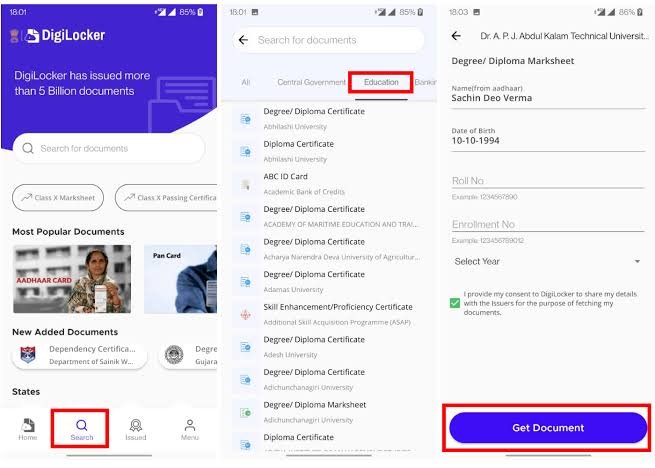
How to Download DigiLocker Documents
Downloading documents from DigiLocker is a straightforward process.
Follow these steps:
- Open the DigiLocker mobile app or visit the official DigiLocker website.
- Log in using your registered mobile number or Aadhaar-linked credentials.
- Complete the OTP verification.
- Open the “Issued Documents” section.
- Select the document you want to save.
- Tap the download option available for that document.
- Save the PDF securely on your phone or tablet.
Repeat this process for every important document you may need during your journey.
Which Documents Should You Download?
Before leaving home, consider saving the documents most relevant to your travel.
These typically include:
- Driving Licence
- Vehicle Registration Certificate
- Aadhaar Card
- PAN Card
- Vehicle Insurance
- Pollution Under Control (PUC) Certificate if driving
- Health insurance details
- Emergency medical records, if applicable
If travelling with family, ensure every adult has access to their own identification documents.
Best Ways to Store DigiLocker Documents Securely
Downloading documents is only one part of preparation. Storing them safely is equally important.
Consider these good practices:
- Save documents inside a password-protected folder.
- Keep copies on your phone as well as a trusted cloud storage service.
- Avoid sharing document PDFs through unsecured messaging apps.
- Lock your smartphone using biometric authentication or a strong PIN.
- Keep your operating system and DigiLocker app updated.
These precautions help reduce the risk of unauthorized access if your phone is lost or stolen.
Can You Use Screenshots Instead of Downloaded PDFs?
Many people rely on screenshots of identity documents. While screenshots may sometimes help identify basic information, downloaded official PDFs from DigiLocker are generally more reliable because they preserve the complete digital document and associated details.
Whenever possible, use the original digital document rather than cropped or edited images.
Are DigiLocker Documents Legally Valid?
Digitally issued documents available through DigiLocker are recognized under India’s Information Technology Act and are accepted by many government departments and agencies for verification purposes.
However, certain authorities, private organizations, hotels, international travel operators, or foreign immigration agencies may still request physical documents or additional identification. Requirements can vary depending on the service provider and the nature of travel.
If you are travelling internationally, always verify the documentation requirements well in advance.
Additional Travel Safety Tips for the Independence Day Weekend
Apart from preparing your documents, travellers should also:
- Charge all electronic devices before departure.
- Carry a power bank.
- Save emergency contact numbers offline.
- Keep digital payment apps updated.
- Check traffic advisories and transport schedules before leaving.
- Keep physical copies of essential documents if your destination specifically requires them.
These small preparations can help avoid unnecessary delays during one of India’s busiest travel weekends.
Final Thoughts
Downloading your DigiLocker documents before travelling this Independence Day is a simple precaution that can save valuable time during document verification and reduce dependence on internet connectivity. While DigiLocker offers convenient digital access, maintaining secure offline copies of essential records provides added peace of mind throughout your journey.
Preparing your identification, vehicle, and travel documents in advance allows you to focus on enjoying the holiday rather than dealing with avoidable last-minute issues.
Takeaways
- Download essential DigiLocker documents before starting your journey.
- Store downloaded PDFs securely with password protection and device security.
- Keep both digital and backup copies of important travel documents.
- Verify if your destination or service provider requires physical documents in addition to digital ones.
Frequently Asked Questions
1. Can I access DigiLocker documents without internet after downloading them?
Yes. Once downloaded to your device, the PDF files can generally be viewed offline.
2. Is a DigiLocker Driving Licence accepted during traffic checks?
Digitally issued Driving Licences available through DigiLocker are widely accepted by government authorities in India, subject to applicable rules and verification procedures.
3. Should I still carry physical documents while travelling?
For domestic travel, DigiLocker documents are often sufficient where accepted. However, carrying physical copies may be useful if a specific authority, hotel, or service provider requests them.
4. Is DigiLocker safe for storing personal documents?
DigiLocker is a government-backed digital platform designed with multiple security measures. Users should also protect their accounts with strong passwords, OTP verification, and secure devices.